


Afternoon Tea ASUS ZenUI Theme

Afternoon Tea ASUS ZenUI Theme
The official app & game
Distributed by UptoPlay
SCREENSHOTS

DESCRIPTION
Use UptoPlay to play online the game Afternoon Tea ASUS ZenUI Theme.
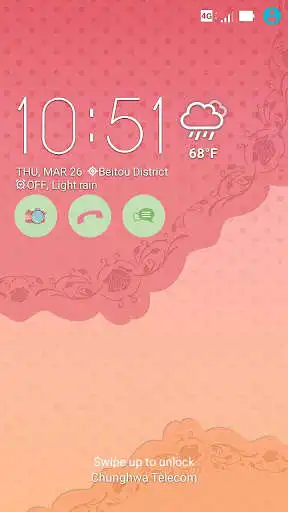
Get whiffs of afternoon tea nostalgia using this dainty theme on your ASUS phone.
Afternoon Tea comes with a classy wallpaper, designed to fit the mood. We carefully crafted this themes icon pack to let your icons transform into lovely little cup plates, bearing tea-time designs right on your ASUS phone.
To keep using Afternoon Teas icon pack with different wallpapers, use your Launcher and follow the steps under Tip.
Download now and let this theme bring back pleasant afternoon tea time memories.
Special feature:
ZenFone 2 models can enjoy a theme-inspired skin on their Quick settings panel, Lock screen, Messaging app, and Contacts app.
How to apply
1. Install Afternoon Tea ASUS Theme.
2. Tap Themes > Installed.
3. Tap Afternoon Tea to apply.
Tip
To change the wallpaper and keep the Afternoon Tea icon pack: Open ASUS Launcher on your device, tap Wallpapers, then choose where youd like to apply the new wallpaper.
Want to get featured?
Send us a link to your online portfolio, or drop us an email attaching your best design image files, so we can review your creations and feature you on our upcoming ASUS Theme packs.
Submissions can be sent via https://designer.zenui.com/and well try to get back to you as soon as we can.
Thank you and hope to hear from you soon!
Enjoy with UptoPlay the online game Afternoon Tea ASUS ZenUI Theme.
ADDITIONAL INFORMATION
Developer: ZenUI Design, ASUS Computer
Genre: Personalization
App version: 1.0.0.150715
App size: 12M
Recent changes: ↑ ★ ★ ★ ★ ★ ↑
Like this theme? Keep us inspired by giving a 5-star rating!
V1.0.0.150715
Add support for Japanese.
Update images of quick settings according to ZenFone2 latest system update.
Comments:
not working to my phone asus zenphone
When i install it nothing happened.
Page navigation: