


Volume Notification

Volume Notification
The official app & game
Distributed by UptoPlay
SCREENSHOTS
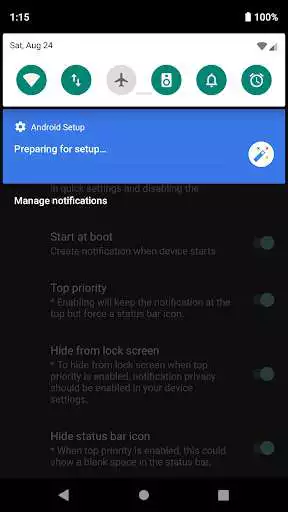
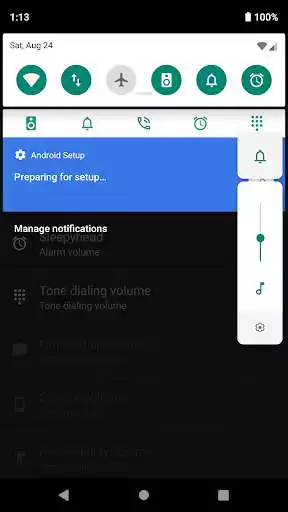
DESCRIPTION
Use UptoPlay to play online the game Volume Notification.
Access your device's sound sliders straight from the notification drawer!
Featuring quick settings tiles for Android N and a discrete notification that matches your launcher for Android 5.0* and above. You'll only notice that it's there when you need it.
This tight little app becomes particularly useful when you want to keep or share any media streaming during a voice call. Or simply when access to physical volume buttons is limited or you just fancy a full touch device.
But it can also be a life saver, when you need to quickly toggle that background audio. Never wished you had it? Well, now you do!
This application is open source and does not require any special permissions.
Please feel free to file any issues or feature requests. Your feedback is always appreciated!
* For Android 4.x please play online the v0.9.5 release directly from GitHub.
https://github.com/seht/volumenotification/releases/tag/v0.9.5
** If your phone controls both the notifications and ringer volume with the same slider this app will not be able to control them separately.
Enjoy with UptoPlay the online game Volume Notification.
ADDITIONAL INFORMATION
Developer: Seht
Genre: Tools
App version: 1.0.7-alpha3
App size: 1.1M
Recent changes: ## When updating from an old version, please reinstall and the clear app data. ##
- Fixed custom theme preference
- Fixed repeating notification
- Fixed new app icon
- Exported background service receiver (to external apps)
- Android 4.x support has been deprecated (please use v0.9.5 from GitHub)
If you find any issues please file a report on GitHub or send me an email. <3
Comments:
Works perfectly onpixel 6 pro. Thank you. I can't believe this isn't already installed on the phone
Awesome! Settled on this app after trying many others. No ads or purchases! It offers great customizability for the notification, plus it also adds buttons for Quick Settings if you'd prefer to use them instead of having an always-present notification. [EDIT: per dev's helpful response, to prevent main screen pop-up message indicating that the Quick Settings buttons are available on Android 7+, just hit 'Cancel' instead of 'Ok'. Doing so on my device has prevented further pop-ups. Thanks!
Page navigation: