


Terms & Conditions

Terms & Conditions
The official app & game
Distributed by UptoPlay
SCREENSHOTS

DESCRIPTION
Use UptoPlay to play online the game Terms & Conditions.
How to play:
When you open up the game you will be presented with two buttons on the main screen; "Play" and "Options".
Selecting "Options" will give you the option to name yourself and to reset your save.
Selecting "Play" will bring you to the next screen; the Lobby. Here you will be able to see some relevant statistics for your playthrough. Crucially, the amount of money you have.
On this screen, you can select "Main Menu" to return to the home screen, or "Go to Work" to start the gameplay.
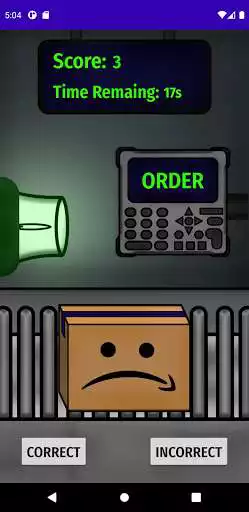
Starting the gameplay will bring you to the conveyor screen. Here you can tap on the 'order computer' and on the 'box'. These with both display a set of items. If all of these items match, you should tap "Correct" on the bottom of the screen; otherwise, tap "Incorrect". Doing this with accuracy is what will earn you money. When the time runs out, you may tap "Go Home" to continue.
Once you have completed at least five rounds, you will get a new screen after tapping "Go Home". Here you will be presented with a choice. Most choices have an option that will cost you money, and one that will not. Some choices can cause you to later lose the game, but if you spend too much money you will lose after being in debt for more than 3 turns.
Survive as long as you can, or until the game breaks. Have fun!
P.S: If you want to play around with the variables in the game / have a sneak peek at the backend. Set your name to 'debug' without the quotes.
Enjoy with UptoPlay the online game Terms & Conditions.
ADDITIONAL INFORMATION
Developer: TASSEL
Genre: Casual
App version: Varies with device
App size: Varies with device
Recent changes: Patched release of terms and conditions.
Page navigation: