


Mi Launcher

Mi Launcher
The official app & game
Distributed by UptoPlay
SCREENSHOTS
DESCRIPTION
Play this online game named Mi Launcher .
Mi Launcher is epic,launcher,personalization, content rating is Everyone (PEGI-3). This app is rated 5 by 6 users who are using this app. To know more about the company/developer, visit Nikao website who developed it. com.epic.launcher.mi.apk apps can be downloaded and installed on Android 4.0.x and higher Android devices. The Latest Version of 1.1.5 Available for download. Download the app using your favorite browser and click Install to install the application. Please note that we provide both basic and pure APK files and faster play online speeds than APK Mirror. This app APK has been downloaded 9781+ times on store. You can also play online com.epic.launcher.mi APK and run it with the popular Android Emulators.
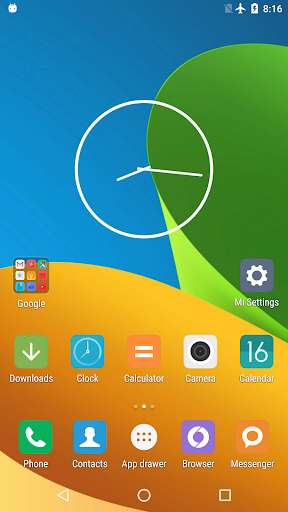
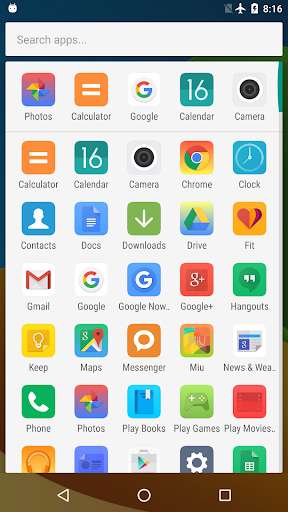
Get MIUI experience on any 4.0+ devices in one second!

NOTE: This is not the official MIUI launcher, it is a highly customizable, performance driven, MIUI look launcher with the app drawer.

Mi Launcher features:

1. Big icons, flat design, customizable icon size and icon text size

2. Colorful icon background, disable it to use MIUI icon background

3. Support ADW icon packs

4. Customizable desktop grid and drawer grid

5. Lock, Unlock desktop

6. Infinite scrolling on desktop, drawer and dock

7. Elastic scrolling on desktop, drawer and dock

8. All apps in the drawer, and you can hide apps

9. Scrollable dock, customizable dock pages and number of dock icons

10. Screen orientation

11. Set default screen for desktop

12. Card stack effect and Cube out scrolling effect

13. Edit shortcut icons and text

14. Enable/Disable wallpaper scrolling

15. Enable/Disable reset drawer position

16. More than 16 icons in folder

17. Resize any widget

18. Backup and restore

19. Keep launcher in memory

20. Change default launcher

Tips:

1. Long-press on the empty space of screen will enter the edit mode.

2. To add a new screen, long-press on an icon and drag it to the right border of the screen.

3. To delete a screen, just remove all the icons and widgets on the screen.

4. To re-order the screens, long-press the screen in edit mode and drag it to left/right screen border.

5. To create a folder on desktop, touch and hold an app, then move it over another.
Updates:
- 1.1.5
+ Fix bugs
Mi Launcher from UptoPlay.net
Page navigation: