


Angle Meter Visual+Bubble
Angle Meter Visual+Bubble
The official app & game
Distributed by UptoPlay
SCREENSHOTS
DESCRIPTION
Play this online game named Angle Meter Visual+Bubble .
Angle Meter Visual+Bubble is thraciansoftware,anglemeter,tools,angle,meter,visual, content rating is Everyone (PEGI-3). This app is rated 5 by 1 users who are using this app. To know more about the company/developer, visit Thracian Software website who developed it. com.thraciansoftware.anglemeter.apk apps can be downloaded and installed on Android 4.1.x and higher Android devices. The Latest Version of 1.162 Available for download. Download the app using your favorite browser and click Install to install the application. Please note that we provide both basic and pure APK files and faster play online speeds than APK Mirror. This app APK has been downloaded 373+ times on store. You can also play online com.thraciansoftware.anglemeter APK and run it with the popular Android Emulators.
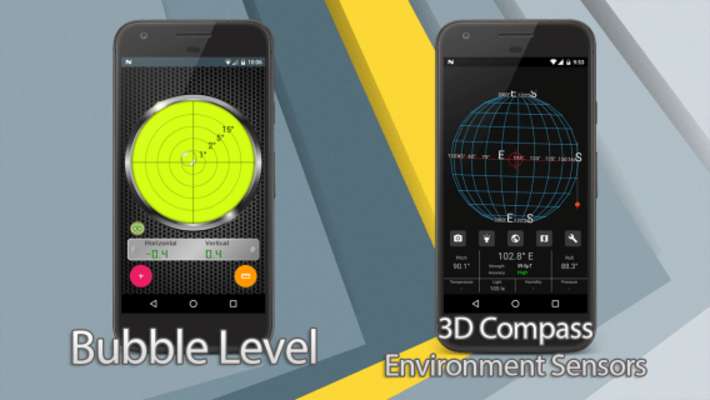
Angle Meter Visual offers more than any angle measurement tool/clinometer. Easy to use, multi-functional application to help you measure, record, and get visual display of your measurements. Open an image from gallery or use your camera, gyroscope(if available) and accelometer as Laser Level Tool. 3D compass with camera, magnetic field, temperature, light, pressure and humidity sensors.(Availibility of sensors depends on your device)

FEATURES:

• Easy to use AngleMeter

• Clinometer

• Elegant Design

• Accurate measurement

• Angle measurement and difference between two measurements

• Bubble/Sprite Level

•  Vertical or horizontal orientation to measure

• Option to toggle y-axis direction

• Record your measurments to database with title and note of your choosing or quicksave with one touch.

• Ruler with length or area measurmet features

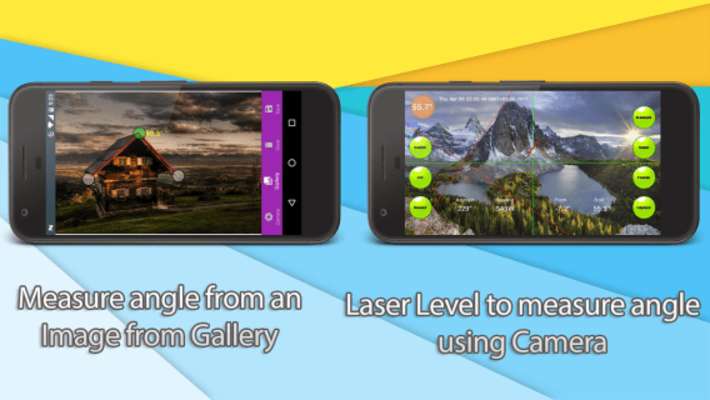
• Open an image from gallery and measure angle from the image

• Use camera to measure angle using laser level

• Display chart of the your recorder measurements

• Create a xls file to possess hard copies of your work

• * 3D Compass with Orthographic and Perspective Projection

• Temperature, Light, Pressure, Humudity Sensor Data(Sensor availibility depends on device and manufacturer)

* Beautiful 3D Augmented Reality compass is courtesy of Adam Ratana

 https://github.com/ratana/rotation-vector-compass

************ INSTRUCTIONS ************

1- Select Measurement Modes

There are 3 measurement modes.

Single Measurement: Measure angle and touch anglemeter to lock measurement.

Difference Between 2 Angles: Measure difference between 2 objects or surfaces, difference is absolute value of 2 measurements

Relative Measurement: Hold your device to slope or angle then touch angle meter and measure rotation relative to previous position. This mode is perfect for using as GONIOMETER.

2- Select Measurement Orientation

Angle is measured as all other apps on the market using accelerometer or gravity sensor. X axis is the short side of your device, long side is Y axis. You can check the image from Google documentation. It's atan(y/x) or atan(y/z) gives the angle measured.

You can check the link to get more info about sensors

https://developer.android.com/guide/topics/sensors/sensors_overview.html#sensors-coords

If you touch the orange button with rotated phone image on it, you change you will be able to change axes from atan(y/x) to atan(y/z) which means measurement angle moving your device away from you or towards you. Or if you enable tablet mode from settings you will be able to measure like you are using a tablet(adds an offset of 180°)  and this will prevent buttons interfering with your measurement.

3- Calibration

Calibration is done by touching button wih + image on it. Touch green Calibration button to set current angle to 0

Use a real angle measurement tool to calibrate your device's sensors with better accuracy.

If you wish to reset the current angle to built-in state touch reset button.

4- Save measurement, records and charts

When you save a record it's written to database and you can display your previous measurement from records section, display them visually using charts. If you have the pro version of the app you will be able to retreive xls files of records or png files of the charts.

5 - Compass

IMPORTANT: You should calibrate your magnetic field sensors on start or if magnetic field strength is high.

Metal or electronical objects interferes with magnetic field and could result wrong results. Magnetic field strength should be low and accuracy must be high to get correct results.

https://support.google.com/maps/answer/6145351?hl=en

**** FEEDBACK ****

** If you add your email address to your crash report when it crashes will let me send you feedback after bug you reported is fixed.

You can check our other Tool/Productivity Apps too, they may also satisfy your needs. Thanks for using our apps.
Updates:
- 3D Augmented Reality Compass UI redesigned
Magnetic Field, Temperature, Light, Humidity, and Pressure sensor data added to Augmented Reality compass(availability of sensors depends on your manufacturer and device model)
Added option to select to start angle meter or bubble level when app is first run.
Anglemeter text color is now selectible
Needles added to display angles
Graphics renewed
Bug Fixes
Angle Meter Visual+Bubble from UptoPlay.net
Page navigation: