


Remove & Add Watermark

Remove & Add Watermark
The official app & game
Distributed by UptoPlay
SCREENSHOTS
DESCRIPTION
Use UptoPlay to play online the game Remove & Add Watermark.
This app can be used to remove or add watermark to images and videos.
You can add watermark to images/videos using text and images with different options including animating the watermark.
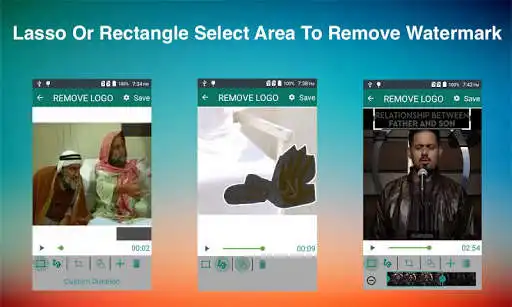
You can also suppress a watermark by selecting its area(lasso or rectangle select) and app can remove it by interpolation of the surrounding pixels.This technique works almost perfectly on alpha-blend watermarks, or you can crop the region outside of watermark area, this works perfectly for media that has logo at edges.
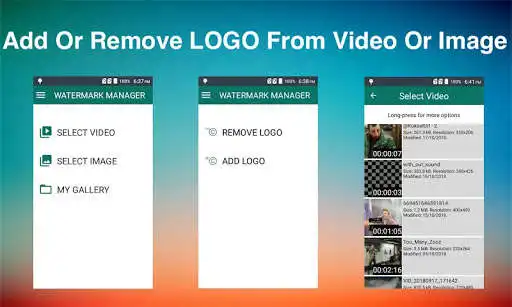
As soon as you start the app it show you option to select image or video
After selection you are asked if you want to remove or add the watermark
If you select REMOVE LOGO option then you are taken to screen with preview and adjustable rectangle with actions(specify more than 1 areas) to specify the area of logo, in this screen can also click on Custom Duration button to specify duration for which to apply filter.You can also choose zoom option and pinch with fingers to better select small watermark area.
If you select ADD LOGO option then you are taken to screen with options to add text or images, here you can also customise each option, like change font, text,
colour, size or rotation.
You can also use prefabricated images as watermarks or can save your specific settings as template, these templates can be applied to a different image or video later using 'saved template' option.
Press Save button and wait for process to complete and view or share the results.
All exports are saved in WATERMARK MANAGER folder in SD card root directory.You can also view the processed files using 'My Gallery' screen
FAQS
How to add more fonts
Copy font files(.ttf) into WATERMARK MANAGER->.fonts directory and app will pick those fonts from there.
How to animate watermark
Select the watermark you want to animate & click the A button in bottom bar & define settings e.g., duration & direction of watermark.
How to improve processed video quality
In edit screen(where you specify watermark area and other components) there is a gear icon on top right corner, please use slowest speed you have patience for and video quality will improve.
How to save my logo settings as template
After defining all logo settings(images, texts) click on top-right gear icon to open settings screen and then click "Save Template"->Give template name and you are done.
What are prefabricated LOGO
These are images that comes with app and can be added as watermarks, these can be loaded from settings screen.
What to do if there are more than 1 watermarks to remove
Use add (+) action button at the bottom bar to specify another watermark area.
Which videos formats are supported
Mainly Mp4 but your video is any other format then it is trans-coded to mp4.
Enjoy with UptoPlay the online game Remove & Add Watermark.
ADDITIONAL INFORMATION
Developer: WATER INC
Genre: Video Players & Editors
App version: 3.5-Lite-LiteEN
App size: Varies with device
Recent changes: Fixed crash in app
Comments:
For some reason, the keyboard doesn't show up when I try to add a text watermark. It may be an error on my part. Unfortunately, longer projects crash, so I recommend processing smaller length files. All else though, whoa baby. Ads aren't that annoying, tools are fairly simple, and IT'S FREE. This app is what I needed! Thanks!
Doesn't work as well as it once did. Crashes alot now. Thats even after clearing the cache and reinstalling the app. Keepa saying app is causing error due to selected video. when i click on most of the videos that happen to be MP4. Will be removing it after I post this.
This was always perfect as far as I'm concerned it's the best watermark app but as if now it's not working at all it loads to 50 % then automatically starts over loading again and never finishing
PLEASE READ THIS IF YOU ARE CONSIDERING DOWNLOADING!!! Did EXACTLY what I wanted and needed. HUGE TIP YOU WILL NEED: once you zoom into the spot you wanted circle it a bunch of times until (try and make the circles the same size) you make it so black and can't see the spot. That is the best way to blend it because otherwise it will be really bad. Might take a few tries but it's definitely worth it.
Horrible. Its hard to use, it doesnt even blur the watermark or anything, just makes you cut out that part of the video, and when I crop and save, it just makes a big blur on the middle part of the video the entire time and doesnt even save the crop or any edits i make! It reduces quality and I hate it! Please don't waste your time and install.."
Page navigation: