


Piano Sheet Reading

Piano Sheet Reading
The official app & game
Distributed by UptoPlay
SCREENSHOTS
DESCRIPTION
Use UptoPlay to play online the game Piano Sheet Reading.
This is the ad-free version.
It includes:
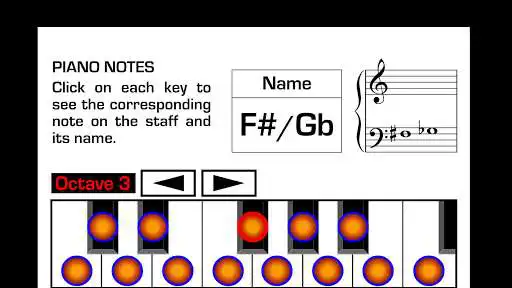
PIANO NOTES SECTION on which you can click notes on the staff to see the corresponding piano key and its name, or viceversa: you can click any key to see the corresponding note on the staff.
This section includes exercises on which a note appears on the staff and you have to click the corresponding key to each particular note. Or in reverse: a key is marked in red and you have to click the right note on the staff. This helps on being able to see a written note and relate it with the keyboard or seeing an specific key and relate with the notes on a sheet music.
There are exercises without time limit to click and there are exercises with time limit to increase the speed to respond.
LESSONS SECTION (Seventy lessons):
These lessons show the way in which the Piano / Keyboard is written in different styles of contemporary music.
- Rock Pop
- Blues Rock
- Jazz
- Funk
- Latin Music
- Fusion
On each lesson you will see a sheet music and you will listen what is written on it. You will see animations of the beats, the notes on the staff and the numbers of the fingers on the keyboard. This allows you to relate what is written on a score with that which is played on the Piano / Keyboard.
By clicking the "a" button you will listen all the instruments. By clicking the "b" button you will only listen the Piano / Keyboard. You can click on the bar from which you want to repeat.
QUIZZES SECTION (Seventy quizzes):
Each Quiz is related to a lesson. There are no more animations of the beats, of the notes on the staff, nor the fingers on the keyboard.
You have to click on a button at the moment when you hear each one of the notes marked in red on the sheet music. This helps to speed up rhythmic reading in real time.
SIGHT READING EXERCISES ON TREBLE CLEF AND BASS CLEF
(30 exercises on Treble Clef - 20 exercises on Bass Clef):
These exercises will help you to develop the ability to relate that which is written in a sheet music with the keys on a Piano / Keyboard, in real time.
When the exercise begins you have to click on each key that corresponds to that which is written. This has to be done at first sight in real time.
In the same way as reading guitar music, flute music, violin music or bass music, all require practice; reading Piano / Keyboard becomes easier if you practice it on a daily basis.
Knowing how to read music is very useful if you get Piano lessons. Being able to understand a music score helps you to get a better understanding of any type of Piano music styles. Practicing is the key and this app has been created to let you practice reading piano sheet music anywhere at anytime. Music notation for piano, organ or any type of keyboard is the same.
Just as a guitar player becomes better if he practices reading guitar sheet music, a piano player becomes better if he practices reading piano sheet music.
Enjoy with UptoPlay the online game Piano Sheet Reading.
ADDITIONAL INFORMATION
Developer: Apps Musycom
Genre: Music & Audio
App version: Varies with device
App size: 65M
Recent changes: - Software update.
Comments:
I have mixed feelings about this app. The graphical interface looks like from 80-ies, so a bit more work on this side would help to enjoy it more. That's not so important though. I tried the easiest exercise and I found really annoying that the next page of the sheet is displayed far too late, the exact moment the next key is supposed to be pressed. A slowly rolling display would be more appropriate.
fully functional. can comply to anyone practicing sheet reading. rated it 4 because the app ui looks like a 4 (compared to yousician). try asking out for some designers to improve ui. you guys probably have some budget for that. if possible, ask for some developers who know how to read input audio to quantized frequencies. it would be useful if we can use our keyboards along with this. this may also be used to practice harmonies
pretty good app and very useful! But sometimes when I exit a practice mode the screen goes black and I can't do anything about it :(.
Doesn't work. I've uninstalled, reinstalled, etc. Just freezes on a red arrow.
It has sharp notes for free very helpful'
Page navigation: