


NPK Credits Calculator

NPK Credits Calculator
The official app & game
Distributed by UptoPlay
SCREENSHOTS
DESCRIPTION
Use UptoPlay to play online the game NPK Credits Calculator.
Farmers can save money and protect the environment by taking credit for the fertilizer value of manure and legume crops. The value of these credits are subtracted from the base (unadjusted) fertilizer recommendations for a field. This reduces the money spent on purchased fertilizer applications and helps prevent over-application. There are formulas and math involved in determining the credit values. This app includes three calculators that have these formulas built in and do all the math for you.
This app calculates the plant-available nitrogen (N), phosphorus (P2O5), potassium (K2O), and sulfur (S) nutrient credits (i.e. the fertilizer value) of manure from various livestock species that are applied to cropland fields. The app also calculates the N credit available to crops that follow forage legumes in the rotation.
Analyzed Nutrient Content is used when the manure has been analyzed by a laboratory for its nutrient content. When using this part of the app, you can:
Select the manure source (livestock species and liquid or solid form).
Select one of the three categories for the time from application to incorporation of the manure.
Enter the reported lab values for either total or available N, P2O5, K2O, and S from the lab report.
Choose the manure application rate by tapping the [- +] buttons to raise or lower the values.
Your calculated nutrient credits from this manure application are displayed at the bottom of the screen. These credits should be subtracted from the base (unadjusted) fertilizer recommendations for a field receiving this manure. If the total nutrient content is entered, the app will covert these values to available nutrient content automatically. Likewise, if the available nutrient content of the manure is entered, the equivalent total nutrient content of the manure sample will be displayed. Tap the Reset button in the center of the screen to clear the nutrient content displays.
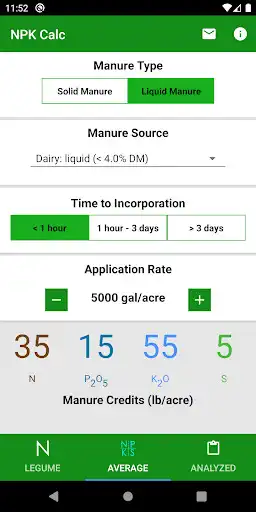
Average Nutrient Content is used when the manure has not been analyzed by a laboratory for its nutrient content. When this is the case, the typical nutrient contents (also called book values) based on lab analysis averages will be used. When using this part of the app, you can:
Select the manure source (livestock species and liquid or solid form).
Select one of the three categories for the time from application to incorporation of the manure.
Choose the manure application rate by tapping the [- +] buttons to raise or lower the values.
Your calculated nutrient credits from this manure application are displayed at the bottom of the screen. These credits should be subtracted from the base (unadjusted) fertilizer recommendations for a field receiving this manure. Manure nutrient content can vary greatly; manure analysis is encouraged.
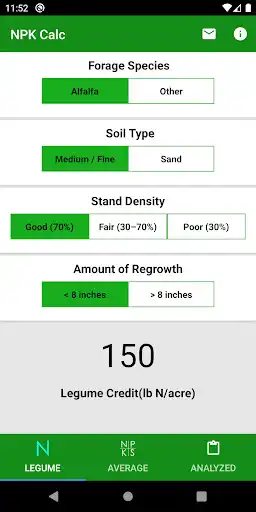
Legume Nitrogen Credits is used when crops follow forage legumes in rotation.
When using this part of the app, you can:
Select the forage legume crop (Alfalfa or Red Clover/Birdsfoot Trefoil).
Select the soil texture of the field (Medium/Fine Soils or Sand).
Select the density of the legume stand at the time of termination.
Select the amount of plant regrowth present at the time the legume crop is killed.
The legume-N nutrient credit available to the crop that follows in the rotation is displayed at the bottom of the screen. This amount should be subtracted from the base (unadjusted) N fertilizer recommendation.
Enjoy with UptoPlay the online game NPK Credits Calculator.
ADDITIONAL INFORMATION
Developer: University of Wisconsin Integrated Pest Management
Genre: Tools
App version: Varies with device
App size: Varies with device
Recent changes: Minor bug fixes and improvements
Updated interface and UI
Comments:
'Great to see nutrient value of these things! 'Helpful app'Page navigation: