


MobileFence - Parental Control

MobileFence
The official app & game
Distributed by UptoPlay
SCREENSHOTS
DESCRIPTION
Use UptoPlay to play online the game MobileFence - Parental Control.
Mobile Fence Parental Control protects children from accessing harmful contents (websites, apps, videos) through smart devices and limits usage time to prevent smartphone addiction.
Also, parents can monitor their childrens location in real time and is notified when their children enters or leaves safety zone set by the parents.
"Help your children enjoy their mobile device safely!"
Child Protection Software.
Main Functions
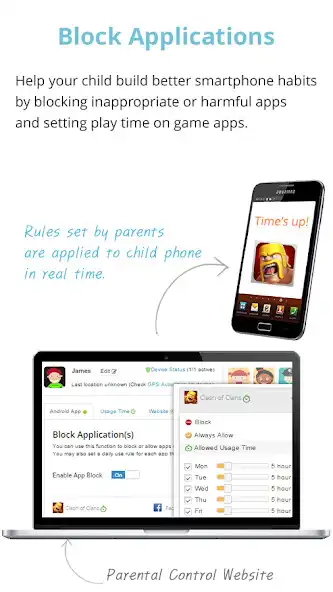
App Blocking - Protect your child against harmful apps. Parents can control and block unwanted apps(adult, dating, pornography, games, SNS..) or set time limits.
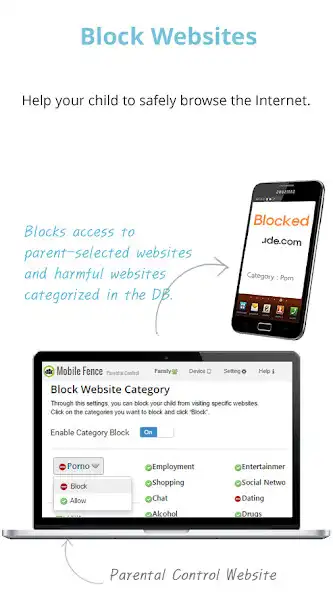
WebSite Blocking (Safe Browsing) - Protect your child from unsuitable web content. Parents can block access to harmful contents or inappropriate sites, such as adult/nude/pornography websites, and monitor list of websites they visited.
Game Play Time - Protect your children from game addiction. Parent can set how long your child can play games in a day.
Planning Device Time - Protect your children from smartphone addiction. Plan a specific time limit for each day of the week to prevent your kids from late-night games, web browsing, SNS.
Geo Fencing - Parents can track location of their kids in case of kidnapping and receive notification when a child enters or leaves the safety zone set by the parents.
Monitor all activities - Parents can view their childs entire online activities, such as device usage time, frequently launched apps, app usage time, visited website, calls & SMS
Call Block - Block unwanted calls, set a list of allowed callers
Keyword Alerts - When a child receives a text including a key words parents have set, it notifies parents immediately so that parents can actively respond to violence and bullying at school.
Block while walking (Prevent Smart Phone Zombie)
How to use
: Before installing Mobile Fence Parental Control on your childs device, try the functions on your device first.
1) Install Mobile Fence on parents smart device
2) Create account and login
3) Link the smart device to Mobile Fence
4) Installation complete
5) Launch Mobile Fence Parental Control app and set family rules.
( Or, login to www.mobilefence.com from PC and set family rules)
How to install and link Mobile Fence Parental Control to childs device
1) Install Mobile Fence to childs device
2) Login with parents account
3) Link Mobile Fence with childs device
http://goo.gl/L6AVDe
Functions
Blocking Service - Block apps, Block website(Safe Browsing), Location tracking, game time limiting, harmful content block(Child Protection), Call Block
Monitoring Service - Launched app, Visited Website, Blocked website, Usage time report, Frequently used app report
Call/Text Service - Call block, Text message monitoring, Keyword Alert, Adult/International call block
Location Tracking - Child location tracking, Lost device tracking, Remote factory reset, Remote device control, Geo Fencing, Geo Watching
Transparency - Share what parents are monitoring and limiting with the child.
Premium
If you install MobileFence Parental for the first time, The premium 30 days of free trial will begin and you can control or limit your child's amount of usage. If you buy premium use after the free trial period is over, you are able to keep using MobileFence Parental Control.
# This app uses the Device Administrator permission.
# This app uses Accessibility services.
# This app collects and transmits the following personal information to the server, processes this information and provides it to parents: phone number, device ID, device location, device app list
---------------------------------------------------
Mobile Fence Parental Control : http://www.mobilefence.com
Facebook : http://www.facebook.com/MobileFence
Enjoy with UptoPlay the online game MobileFence - Parental Control.
ADDITIONAL INFORMATION
Developer: Mobile Fence
Page navigation: