


Linphone (Tasker Plugin)

Linphone (Tasker Plugin)
The official app & game
Distributed by UptoPlay
SCREENSHOTS

DESCRIPTION
Play this online game named Linphone (Tasker Plugin).
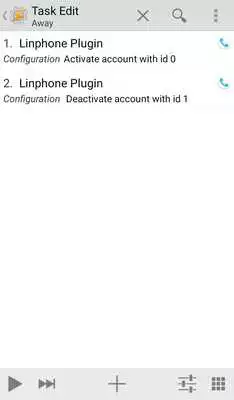
Linphone Plugin is a Locale/Tasker plugin to activate or deactivate sip accounts on the Linphone appYou can now enable/disable accounts based on your wi-fi connection, your location, the time of day, and so on.
Install Tasker, then install this plugin to add a Linphone Plugin task to Tasker to allow you to enable/disable linphone accounts.
If you want to change your extension depending on whether you are in or out of the office you now can.
If you want to turn off your sip phone out of hours you now can.
Hint: If you are disabling one account and enabling another, perform the enable FIRST so the default account moves
i.e. always enable THEN disable.
Hints to keep Linphone alive:
Android 8 & 9 =============================
1. Linphone: Settings: Advanced: Enable service notification (consider disabling banner in Android Settings: Notifications: Linphone: Disable Notifications)
2. Android Settings: Battery: App Launch: Linphone: Manage Manually
Android 9 additional step =============================
3. Android Settings: Search for 'Special Access' . 'Battery Optimisation', toggle 'Not Allowed', Select 'Linphone', should now be tagged 'Not allowed'
See https://github.com/GrahamJB1/linphone-plugin for source
Updates:
Increase platform version
Linphone (Tasker Plugin) from UptoPlay.net
Page navigation: