


KEBA eMobility App

KEBA eMobility App
The official app & game
Distributed by UptoPlay
SCREENSHOTS
DESCRIPTION
Use UptoPlay to play online the game KEBA eMobility App.
The KEBA eMobility App is a digital service for KeContact P30 users (x-series, company car wallbox, PV EDITION and c-series). The App allows you to communicate with the charging station as well as to manage and configure it. It gives you full control over your wallbox simply with your mobile device.
What the KEBA eMobility App can do:
-Communicate with your wallbox via remote access from anywhere (communication with KeContact P30 c-series still takes place via the local network)
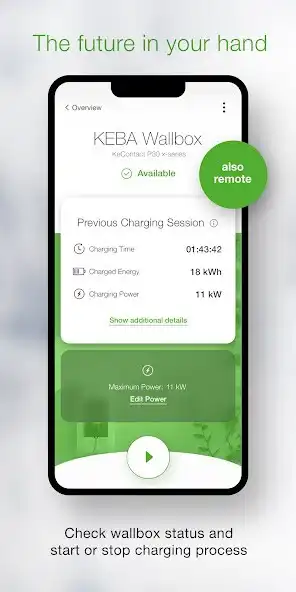
-Get information about the current status of your wallbox. Is it charging? Is it ready to charge? Is it offline? Is there an error?
-Control your charging process by starting and stopping the current charging process simply in one click.
-Setting the maximum charge rate gives you full control over your vehicles current power input and thus the charging time.
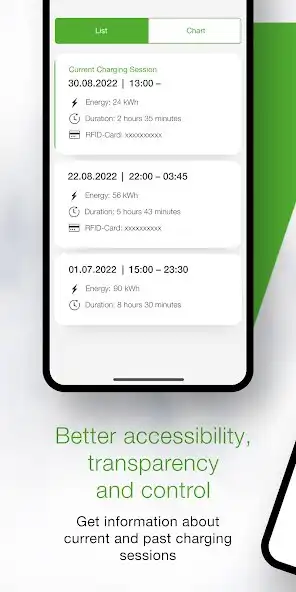
-You can follow all the details and real-time data (time, energy, performance, amperage, etc.) of your current charging process directly via the App and track past charging sessions in the history.
-Retrieve all data about your energy consumption to date in the statistics section.
-The Setup Guide in the App helps you find out whether your wallbox has the right requirements for the use with the App. If it does, the Setup Guide will help you with the initial connection and setup of your wallbox until its ready to use.
-By means of power profiles, charging processes can be started and stopped automatically at predefined times and with predefined maximum charging power. (Setting via the KEBA eMobility Portal and only for x-series, company car wall boxes and PV EDITION).
-Always keep your wallbox up to date with the latest software via App or Portal by enabling automatic updates (not for KeContact P30 c-series models).
-The App provides all configurations you as a x-series user already know from the web interface (not for KeContact P30 c-series models).
These KEBA wallboxes are compatible with the app
-KeContact P30 x-series, company car wallboxes, PV EDITION (to use all the features, update your x-series to at least the software version 1.13 with the App required minimum software version: 1.9)
-KeContact P30 c-series (no update of your c-series firmware necessary for the use of the app)
Charging stations that have charge point operators may not be suitable for app use. This is definitely the case if the web interface password or serial number is not available to you.
Unlike using the KEBA eMobility app with the x-series, connecting it to the KeContact P30 c-series, does not provide full access to all the functions. For an overview of the different functions of the KeContact P30 series, go to www.keba.com/emobility-app.
Do you already know the KEBA eMobility Portal? Register in the App or in the Portal and use all advantages and further features now also on the browser-based KEBA eMobilty Portal: emobility-portal.keba.com
Important note for electricians:
-The DIP switch settings on the wallbox must still be configured manually.
-Configurations that are already known from the web interface can also be made via the App or the Portal.
-DIP switch settings must be adjusted in the KeContact P30 c-series to activate full UDP communication capabilities (as also described in the Setup Guide).
Enjoy with UptoPlay the online game KEBA eMobility App.
ADDITIONAL INFORMATION
Developer: KEBA Energy Automation
Recent changes: - The loading time for the PV Boost Button was improved.
- The display texts for PV-Charging can now be edited.
- The OCPP connection settings are now shown (the app must be connected to the wallbox directly).
- The links in the help section for the quick install guide and the manual were updated.
- Bugs preventing adding a wallbox via IP-Address are fixed
- Several small improvements.
Page navigation: