


DIRECTV FOR BUSINESS Remote

DIRECTV FOR BUSINESS Remote
The official app & game
Distributed by UptoPlay
SCREENSHOTS
DESCRIPTION
Use UptoPlay to play online the game DIRECTV FOR BUSINESS Remote.
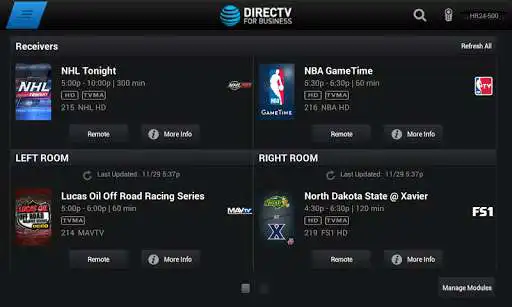
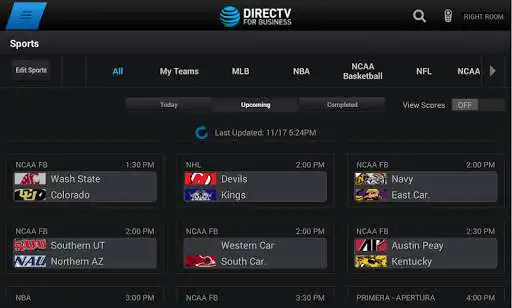
The DIRECTV FOR BUSINESS App gives you control of all your DIRECTV Receivers!
Quickly identify receivers with custom names
See whats playing on all your TVs from one screen
View all current and upcoming sports schedules
Ability to group receivers in order to change multiple TVs at once
Requirements
-Android tablet running OS 7.0 and higher
-DIRECTV customers must have a Business account registered on DIRECTV's website, https://www.directv.com/myaccount/registration, to access the DIRECTV FOR BUSINESS app for tablets. In the Enter your last name field, enter your business name exactly as it appears on your DIRECTV account. The email address and password you provided will be used to activate your DIRECTV FOR BUSINESS App
-Commercial account must subscribe to HD service
-Compatible DIRECTV HD Receivers must be broadband connected. The tablet and DIRECTV HD Receivers must be connected to the same local network. Requires a Wireless Router and DIRECTV Ethernet to Coax Adapter (DECA).
Use of the DIRECTV FOR BUSINESS app by DIRECTV customers is subject to DIRECTV's Customer Agreement available at https://www.directv.com/legal/legal-policy-center/
and Privacy Policy available at https://www.directv.com/privacy/video-privacy-policy/
Enjoy with UptoPlay the online game DIRECTV FOR BUSINESS Remote.
ADDITIONAL INFORMATION
Developer: DIRECTV, LLC
Page navigation: