


Control Center IOS 14 - Control Center
Control Center IOS 14
The official app & game
Distributed by UptoPlay
SCREENSHOTS
DESCRIPTION
Use UptoPlay to play online the game Control Center IOS 14 - Control Center.
What is Control Center IOS 14?
Control Center IOS 134is an easy tool for Android devices. It's fast, its smooth, and its totally FREE.
With a floating bar on the screen, you can easily use your Android smart phone. More conveniently, you can quickly access to all your favorite apps, games, settings and quick toggle, screen capture, screen recording. Control Center is also an ideal app to protect the physical buttons (volume button). It is very useful for big screen smart phone.
Control Center 2020
- Virtual Volume button, quick touch to change volume and change sound mode
- Easy touch to open your favorite application
- Go to setting very quick with a touch
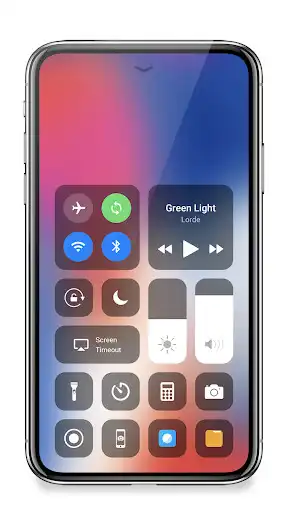
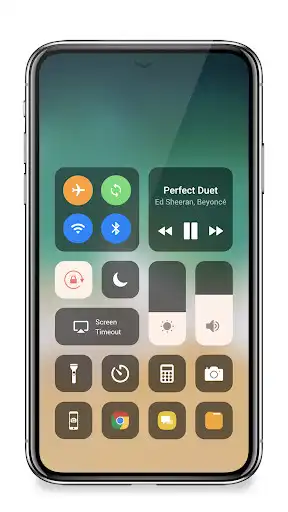
Quickly change settings and open apps
- Capture Screenshot: Capture screen
- Record Screen: Record any action in your phone. (Support android 5.0 above only)
- WiFi: Turn on Wi-Fi to browse the web, stream music, play online movies, and more.
- Bluetooth: Connect to headphones, car kits, wireless keyboards, and other Bluetooth-enabled devices.
- Do not disturb mode: Silence calls, alerts, and notifications that you receive while your device is locked.
- Brightness: Adjust the brightness of your display from any screen.
- Screen timeout
- Control audio: From here, you can quickly play, pause, and control volume of your favorite song, podcast, and more.
- Airplane mode: Use Airplane Mode to instantly turn off Bluetooth, Wi-Fi, and cellular connections on your android device.
- Flashlight Super Bright: The LED flash on your camera doubles as a flashlight, so you can get extra light when you need it.
- Screen rotation: Portrait Orientation Lock, keep your screen from rotating when you move your device.
- Calculator: Tap numbers and functions in Calculator, just like a standard calculator.
- Camera: Never miss a moment to take a picture with quick access to your camera.
- Alarms and Timer: Set an alarm, timer, or stopwatch, or check the time in another country or region.
- Launch all applications or games on your device
Home Bar Gesture (VIP version)
- Select action for swipe gesture (e.g. swipe to go to home, swipe to back...)
- Select action for click gesture
- Select action for double click gesture
- Select action for long click gesture
- Actions include: show control center, go to home, go back, open recent app, quick setting, notification center, power popup, capture screenshot.
Customize
- You can change color of bar with your favorite color, totally free
- Change position of the bar (left, right, bottom)
- Change size of bar (width, height)
- Change opacity of bar
- Add or remove apps or controls on the Control Center
Feedback
- If you like Control Center please review and give us 5 start
- If you have any problem with this app please give us feedback for your problem, we will fix it quickly
- Please email for us if you want send request function
Permission
- CAMERA to turn on Flashlight, not take a photo.
- We never publicly disclose any personal or sensitive user data related to financial or payment activities or any government identification numbers, photos and contacts, etc.
This app uses Accessibility services.
Thank for your support
Enjoy with UptoPlay the online game Control Center IOS 14 - Control Center.
ADDITIONAL INFORMATION
Developer: Assistive Touch Team
Genre: Personalization
App version: 2.173
App size: 11M
Comments:
So far, the app has been working well. And it works seamlessly with the developer's assistive touch app. I can't say much about the screenshot and screen recorder features because I don't use them; my LG G8 ThinQ has built-in screenshot and screen recorder features. I do, however, have two suggestions: (1) An additional row for Favorite apps so that it'll be 3 rows, and (2) minimize the ads to the bottom of the screen. I get that the ads help financially support the developer's work, but they're really obnoxious full-page ads with sound that take away from the user's experience. Additionally, I paid for the ad-free version yet, I keep being bombarded with ads. I don't mind the ads for the developer's other apps but everything else can go or be minimized to the bottom of the screen. Although, I actually shouldn't be seeing any ads...because that was the purpose of paying for the app.
This one is MUCH BETTER than the LuuTinh one... (The most downloaded in Google play). This one does not automatically close. That one often closes when you clean up notifications. The LuuTinh one: Sometimes you can't find the touch bar.. this one doesn't. This one also doesn't force-play fullscreen ads.. the LuuTinh one plays crazy amount of ads.. sometimes it's kinda like porn... Very annoying. This one doesn't have all the bad things. It's clean and efficient ! Love it!!
Okay I also have tried my share of these, most are slow, some don't react at all like advertised. I don't like searching for just the right spot with my thumb. I really like this little program, quick, more custom features, and a power button!! Yes! Some nice closed app functions too, Great job, I will check some of your other apps out because this one is so superior.
Best App Ever!! I own a Samsung galaxy J3 and it works great!!! Pros: Works with IHeartRadio or Spotify, Has cool features. Cons: Screen Recording feature needs some work, tried to record a video I was watching and when I played it back there was no audio.. Might an update to fix that bug... 8/10 Would reccomend:)
`This app is good. Just as what I need. Couple of issues though. When I press Airplane Mode and Location, it takes me to the Settings to then enable it. It won't enable on the control center itself. Also, when I go to the background settings and use the "Screen Blur Behind" option, it works for once but when I open another app and open the control center, the blurred background it uses is still the app from the previous one. I think it's bug that needs to be fixed. Overall, the experience is good`Page navigation: