


AgaMatrix Diabetes Manager
AgaMatrix Diabetes Manager
The official app & game
Distributed by UptoPlay
SCREENSHOTS
DESCRIPTION
Use UptoPlay to play online the game AgaMatrix Diabetes Manager.
Dashboard
Organize modules on the dashboard to show the information you want, in the order you choose.
Sharing
Invite your caregivers to view your glucose readings in real time, or email all of your data in a traditional logbook format.
Reminders
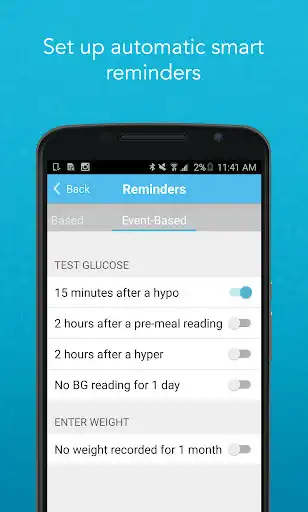
Reminders can be automatically triggered by another event; for example, 15 minutes after a hypo result, you will receive an automatic reminder to test again.
Compatible Meters
Automatically sync with the following meters:
AgaMatrix Jazz Wireless 2 Blood Glucose Meter
CVS Health Advanced Bluetooth Glucose Meter
Amazon Choice Blood Glucose Monitor
Meijer Essential Wireless Blood Glucose Meter
Cloud Support
Sign up for an account and back up your data on our HIPAA compliant server.
Multiple Data Types
Record glucose, insulin, carbs and weight with a touch of a button.
Timeline
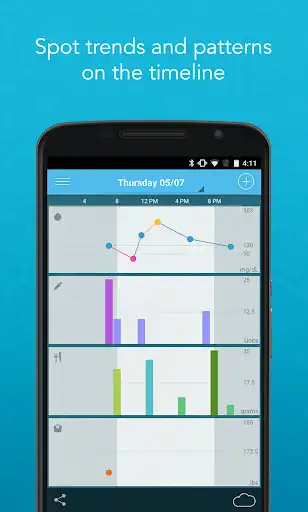
Track all your data in one place to easily spot trends. Choose the view that works best for you: 1 day, 1 week or 1 month.
Logbook
Rotate the app for the glucose logbook you know and love, organized by meal block.
Customer Service
AgaMatrix has a 10-year track record developing products and customer service experts easily accessible. Contact us by phone: 866-906-4197 or email [email protected].
Love our app? Rate us in the Play Store! Running into a bug or have feedback? Email us at [email protected].
Enjoy with UptoPlay the online game AgaMatrix Diabetes Manager.
ADDITIONAL INFORMATION
Developer: AgaMatrix Inc
Genre: Medical
App version: 1.13
App size: 20M
Recent changes: - Added the option to export all data
- Added support for Android 12
- Minor bug fixes
Comments:
Only works for Aga aka Choice diabetic meters. This is fine because the meters and test strips are very reasonably priced in comparison with prices being charged by others. The software is well designed and has a convenient and intuitive operation. The one confusion I had was how to sync. Easy. Select the menu (the three horizontal lines at top left) and select Meters then select your meter... probably the only one for most people. It will ask you to turn on the meter, syncs when it sees it.
UPDATE Pedro at customer service was excellent. They might have to send a new meter. The bluetooth communication to the app has continually failed to be maintained. My phone (Moto G6) has no problem finding and pairing with the meter, the app seems to keep losing it. This app needs to comunicate with the device at intervals, such as everytime it turns on. Logging events and reviewing are great. The app had solid features and good customization. The push notifications are on point.
Its nice that it charts your reading and makes it really easy for my doctor and I to see how my treatment is working. However, I have to hit them hard on the star rating as they do not allow you to delte entries made by your meter via Bluetooth. I am going to look for one with similar feature but allows me to remove entries that are not acurate.
`Everything is working great for me, I'm pretty sure the reviews I saw stating there meter wouldn't sync, is due to them not reading the "about app" section. It states right there the compatible meters, only 4 compatible meters at this time. The only thing about the app that will help me, and possibly others. Is to have the option for insulin pump, so unfortunately I can only put my Bolus rate in, I would like to have an option to enter my Basal rate. Great app, definitely will help diabetics.`,It would be more useful if I could sync all the data in my meter and not just the data entered since getting the app. Edit: Not gonna do that, but fine. Mostly gave 3 stars so you would see this. I would love to have a way to upload data. I am checking blood sugars several times a day, and it's a pain to have to manually enter every single thing. Csv upload abilities would make this a 5 star app for me. Thanks."
Page navigation: