


TSF NEXT Nova ADW LAUNCHER DIAMOND ANDROID THEME
TSF NEXT Nova ADW LAUNCHER DIAMOND ANDROID THEME
The official app & game
Distributed by UptoPlay
SCREENSHOTS
DESCRIPTION
Play this online game named TSF NEXT Nova ADW LAUNCHER DIAMOND ANDROID THEME .
TSF NEXT Nova ADW LAUNCHER DIAMOND ANDROID THEME is gluck,tsfnextadwsmartmulti,theme,diamond,android,entertainment, content rating is Everyone (PEGI-3). This app is rated 5 by 1 users who are using this app. To know more about the company/developer, visit SGluck website who developed it. com.gluck.tsfnextadwsmartmulti.theme.diamond.android.apk apps can be downloaded and installed on Android 2.2.x and higher Android devices. The Latest Version of 1.0 Available for download. Download the app using your favorite browser and click Install to install the application. Please note that we provide both basic and pure APK files and faster play online speeds than APK Mirror. This app APK has been downloaded 900+ times on store. You can also play online com.gluck.tsfnextadwsmartmulti.theme.diamond.android APK and run it with the popular Android Emulators.
** IF YOU HAVE ANY PROBLEMS PLEASE CONTACT US BEFORE LEAVING NEGATIVE FEEDBACK **

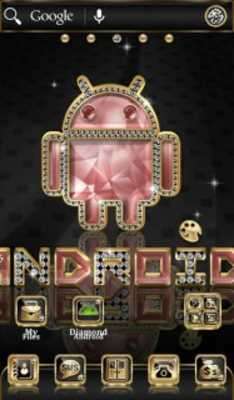
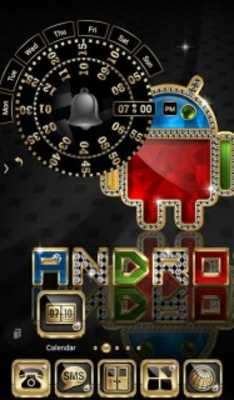
This Multi Launcher Theme contains a wallpaper set, an icon pack, and a matching analog alarm clock.

This is not an Application or a Launcher by itself, but it is compatible with the majority of Launchers available on Google Play.

You MUST have installed one of this Launchers to use this theme:

TSF Launcher

Next Launcher

Nova Launcher

ADW Launcher

Smart Launcher

Apex Launcher

Atom Launcher

Holo Launcher

Go launcher Z

*************** (:|:) ***************

TO APPLY THE THEME:

TSF Launcher:

Smart Button > Themes >  Diamond Android  Theme

Clock:

Smart Button > Add > Widgets > System widgets >  Diamond Android  clock

Wallpapers:

Smart Button > Wallpaper > Gallery Apps >  Diamond Android

*************** (:|:) ***************

Next Launcher:

Long press desktop > Theme >  Diamond Android

Clock:

Long press desktop > Widget > System widget >  Diamond Android  clock

Wallpapers:

Long press desktop >  Wallpaper >  Diamond Android

*************** (:|:) ***************

ADW Launcher:

Press desktop > ADW Settings > Themes >  Diamond Android  Theme > Apply

Clock:

Press desktop > Add > Widgets >  Diamond Android  Theme >  Diamond Android  clock

Wallpapers:

Press desktop > Wallpaper >  Diamond Android

*************** (:|:) ***************

Nova Launcher:

Nova Settings > Look and feel > Icon Theme >  Diamond Android  Theme

Clock:

Press desktop > Widgets >  Diamond Android  clock

Wallpapers:

Press desktop > Wallpapers > Apps and Themes >  Diamond Android

Dock:

Nova Settings > Dock Background > Content > Image > Select theme >  Diamond Android

*************** (:|:) ***************

Smart Launcher:

Menu > Preferences > Theme >  Diamond Android

Wallpapers:

Menu > Wallpaper > From Apps >  Diamond Android

Clock:

Press clock > Replace widget >  Diamond Android  Theme

*************** (:|:) ***************

Apex Launcher:

Apex settings > Theme settings >  Diamond Android  > Apply

Clock:

Press desktop > Widgets >  Diamond Android  clock

Wallpapers:

Press desktop > Wallpapers >  Diamond Android

*************** (:|:) ***************

Go Launcher Z:

Press desktop > Theme > Right Top Corner Installed >  Diamond Android  > Apply

Clock:

Press desktop > Edit > Widget > System widget >  Diamond Android  clock

Wallpapers:

Press desktop > Edit > Local > More >  Diamond Android

*************** (:|:) ***************

Holo Launcher:

Appearance Settings > Icon pack >  Diamond Android  Theme

Wallpapers:

Press desktop > Wallpapers >  Diamond Android

Clock:

Press desktop > Widgets >  Diamond Android  clock

*************** (:|:) ***************

Atom Launcher:

Launcher settings > Theme Settings >  Diamond Android  > Apply

Wallpapers:

Press desktop > Wallpapers >  Diamond Android

Clock:

Press desktop > Widgets >  Diamond Android  clock

*************** (:|:) ***************
Updates:
- Fixed Alarm Clock.
TSF NEXT Nova ADW LAUNCHER DIAMOND ANDROID THEME from UptoPlay.net
Page navigation: