


Tha Icon Changer

Tha Icon Changer
The official app & game
Distributed by UptoPlay
SCREENSHOTS
DESCRIPTION
Play this online game named Tha Icon Changer .
Tha Icon Changer is dcombl,thaiconchanger,personalization,icon,changer, content rating is Everyone (PEGI-3). This app is rated 3 by 1 users who are using this app. To know more about the company/developer, visit dcomobile website who developed it. dcombl.thaiconchanger.apk apps can be downloaded and installed on Android 2.2.x and higher Android devices. The Latest Version of 1.0 Available for download. Download the app using your favorite browser and click Install to install the application. Please note that we provide both basic and pure APK files and faster play online speeds than APK Mirror. This app APK has been downloaded 3253+ times on store. You can also play online dcombl.thaiconchanger APK and run it with the popular Android Emulators.
The final step to managing your ultimate collection of icons from THA PHLASH!

Now you can finally have your icon’s instantly adapt for your launcher without having to manually change and do all that extra work each time you want to apply a fresh new style from ThaPhlash’s arsenal of amazing icon packs.

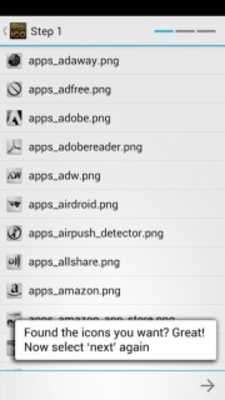
★THIS APP WILL ONLY WORK WITH★- ICONS DOWNLOADED USING THA ICON ULTIMATE- ICON PACKS SAVED ON YOUR DEVICE FROM THA PHLASH'S WEBSITEWhen the app opens you are shown the content of your devices storage or SD Card.

You must browse to the folder of the icons before you can move forward to build the theme.

If you have any suggestions or questions, please email me instead of asking in comments, I can not reply to market comments.

Please visit our website for any frequently asked questions & don't forget to rate 5 stars if you like it! Thanks!

★ HOW TO USE THA ICON CHANGER ★

- BROWSE TO FOLDER WITH ICONS

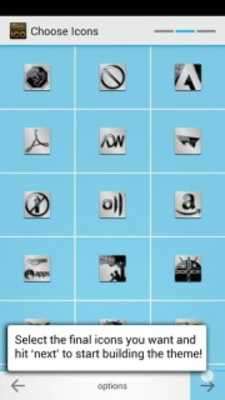
- SELECT ICONS TO USE IN THEME

- WAIT FOR THEME TO BE BUILT

- INSTALL THEME (Or Overwrite)

★ HOW TO APPLY THEME AFTER BUILDING ★

+GO LAUNCHER:

- Select "MENU" on device

- Select "Preferences"

- Select "Visual Settings"

- Swipe right to "Icons"

- Select "Theme Icon"

- Select "Tha Theme"

+ADW / ADW EX:

- Select "MENU" on device

- Select "ADWSettings"

- Select "Themes"

- Select "Tha Theme"

- Select "Apply" in the upper right

+APEX:

- Select "MENU" on device

- Select "Apex Settings"

- Select "Theme Settings"

- Select "Tha Theme"

- Select "Apply"

+NOVA:

- Select "MENU" on device

- Select "Nova Settings"

- Select "Look and Feel"

- Select "Icon Theme"

- Select "Tha Theme"

Visual instructions for all these launchers are shown in our video!

------------

★ WHEN USING ICON PACKS FROM THA PHLASH'S WEBSITE ★

The zip icon packs bought from the website, usually contain size options available in 72x72 and 200x200.

- If you have a slow device, choose the 72x72 sized icons.

- For better devices, you can use 200x200 sized icons, but the size of the theme may be large, and will take longer to make than expected.

------------

Huge thanks to Ben Lee ofhttp://www.bencodes.comfor help with app-development.

This app does not require root.

Youmusthave 'allow unknown installations' enabled to install theme from sdcardThis app does require an internet connection to get the latest updates for the theme with each use. While the file is very small, we are not responsible for your data usage.Permissions:

- USB Storage : Used to Build/Store theme on device

- Network communication : Only used to play online latest source with each theme build.

----

The custom theme does not use these permissions in anyway, but installing a theme from the sdcard may show these permissions.

- Storage:modify/delete SD card contents

- Phone calls:read phone state and identityTags:thaphlash, thaicon, bentot, home launcher, theme, adw launcher, go launcher, apex launcher, nova launcher, iconpack, dcombl
Updates:
Tha Icon Changer from UptoPlay.net
Page navigation: