


Data Backup Free

Data Backup Free
The official app & game
Distributed by UptoPlay
SCREENSHOTS
DESCRIPTION
Play this online game named Data Backup Free .
Data Backup Free is dataexport,tools,data,export, content rating is Everyone (PEGI-3). This app is rated 5 by 1 users who are using this app. To know more about the company/developer, visit Webdoor website who developed it. wd.dataexport.apk apps can be downloaded and installed on Android 4.0.x and higher Android devices. The Latest Version of 3.2 Available for download. Download the app using your favorite browser and click Install to install the application. Please note that we provide both basic and pure APK files and faster play online speeds than APK Mirror. This app APK has been downloaded 1187+ times on store. You can also play online wd.dataexport APK and run it with the popular Android Emulators.
FILE, DIRECTORY, SMS, BACKUP TO SD CARD, FTP or E-MAIL

Backup your photos, files, folders or SMS messages automatically to your SD card, FTP server or send to your e-mail address.

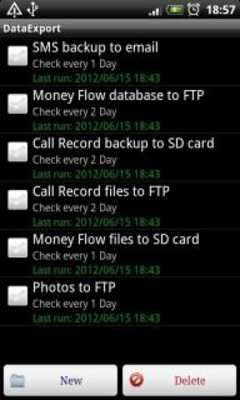
You can set many "backup-rules" to save your important files, folders, or SMS messages from your device.

Example:

If you want to save automatically every day or every hour etc. your new photos from SD card to your FTP, you can add a new "rule" in "List of rules" and complete the following settings:

  - first you need to set up your FTP access in main menu "FTP"

  - go to "List of rules" menu and press the "New" key

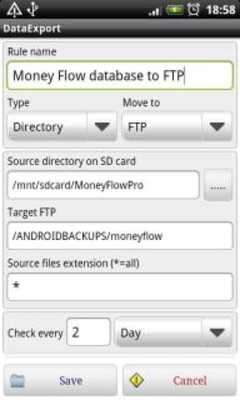
  - add a name to your new rule, select the type of source (File, Directory, SMS), select the target type (Move to: E-mail, FTP, SD card), select the source and target path, and the occurence (Check every: x-minute, hour, day, month). Save the rule.

You can set the following rule types:

Directory ---> SD card

Directory ---> FTP

Directory ---> E-mail

File ---> SD card

File ---> FTP

File ---> E-mail

SMS ---> SD card

SMS ---> FTP

SMS ---> E-mail

- If you have a rule to save a directory every day, when the application run 2. time, will save only the new or modifyed files

- You can edit the rules in "List of rules" menu by tap and hold the item.

- If you don't have SMTP access to send outgoing e-mail messages, you can use your G-Mail free SMTP:

go to application main menu: "E-mail" and make the following setting:

SMTP Address or IP: smtp.gmail.com

SMTP User: Your G-Mail email address

SMTP Password: your G-Mail password

SMTP Port: 465

You can buy the paid adsfree version here in Android Play with Google Checkout
Updates:
- Now you can export all kind of files to FTP
Data Backup Free from UptoPlay.net
Page navigation: