


Backup Text for Viber
Backup Text for Viber
The official app & game
Distributed by UptoPlay
SCREENSHOTS
DESCRIPTION
Play this online game named Backup Text for Viber .
Backup Text for Viber is smeiti,vbtotext,tools,backup,text,viber, content rating is Everyone (PEGI-3). This app is rated 5 by 1 users who are using this app. To know more about the company/developer, visit SMeiTi website who developed it. com.smeiti.vbtotext.apk apps can be downloaded and installed on Android 2.3.x and higher Android devices. The Latest Version of 1.0.2 Available for download. Download the app using your favorite browser and click Install to install the application. Please note that we provide both basic and pure APK files and faster play online speeds than APK Mirror. This app APK has been downloaded 1802+ times on store. You can also play online com.smeiti.vbtotext APK and run it with the popular Android Emulators.
Backup Text for Viber allows you to export your Viber messages, convert to Plain Text, CSV, Excel and HTML file formats and yes, those files can be read in your phone or computer! Your exported files can be saved on your phone's SD card or sent to your email as attachment. It is fast and easy to backup your Viber messages!

♥♥ Your Viber need to be updated to version 3.0 or later

★ Features:

* Export your conversation messages and Emoticon icons can be displayed in the HTML format

* Export and send to your email as attachment directly

* Filter by conversation

* Filter by date

* Filter by message type

* Sorting messages

* Export to Normal plain text (*.txt)

* Export to CSV, comma-separated values (*.csv)

* Export to Excel 2007/2010 workbook (*.xlsx)

* Export to HTML conversation (*.html)

* Export to HTML table (*.html)

* Selectable date and time format

* Support Unicode UTF-8 encoding with/without BOM

* Support Windows, Unix, Mac plain text new line format

★ Our Facebook page has some Sample Output screenshots

♥ Backup Text for Viber and SMS to Text share same file format. Using our app SMS to Text, those export Viber messages can be restored to your phone as SMS

♥♥ How to use:

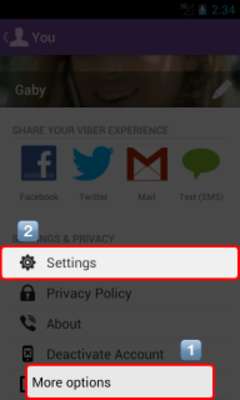
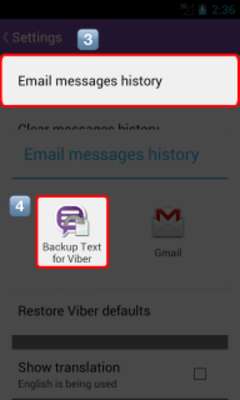
Backup Text for Viber export your messages, based on your Viber messages history backup. Please follow the steps below, to make the up-to-date messages history backup:

1. Open your Viber

2. Press the Menu button

3. Click "More options"

4. Click "Settings"

5. Click "Email messages history"

6. Select "Backup Text for Viber"

7. Start to export your messages

♥ If you have any feedback, questions, or concerns, please contact us at:

[email protected]

http://www.facebook.com/BackupTextForViber

Viber is a trademark of Viber Media, Inc.
Updates:
- v0.9.4 (2013-07-01)
* Bug fixes
v0.9.1 (2013-05-22)
* Bug fixes
v0.9 (2013-05-01)
* Backup Text for Viber first launched
Backup Text for Viber from UptoPlay.net
Page navigation: