


Background Changer & Eraser

Background Changer & Eraser
The official app & game
Distributed by UptoPlay
SCREENSHOTS
DESCRIPTION
Use UptoPlay to play online the game Background Changer & Eraser.
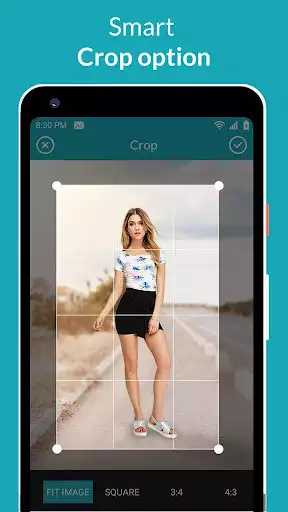
Background Changer & Eraser is the best photo editing app to remove background from your images.You can use any image as a background too. You can use your photos as a background. It's available freely at the play store. So, play online it now and enjoy this bg remover tool.
Features of Background Changer & Eraser app:
# Easy method to remove the background.
# Place your desired background image.
# Auto-Erase function is available.
# You can manually delete the background.
# Background Repair Tool available.
# A large collection of built-in backgrounds available.
This background eraser supports multiple erase modes and Handy Tools like -
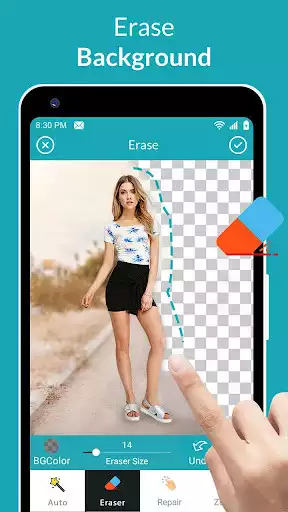
1. Auto erasing: This mode allows you to Touch and erase portions of image based on Color, Threshold and Texture. Use this for Fast Processing when background has similar colors
2. Manual: Allows you to Erase Manually by just using your finger as a brush. Use Offset for easy erase.
3. Extract: Allows you to select an area to Cut by just drawing a closed loop
4. Restore : Allows you to restore erased areas.
5. Zoom : Zoom your picture for perfect cut
6. Magnifying Glass: Shows you which portion are you cutting/selecting.
7. Different Brush Types : Change Brush Size and Brush Type - Circular and Square
8. Undo/Redo Option for handling any mistakes.
Cut Photos , Erase Backgrounds, Create Photo layers Superimpose and Photo Montages with this easy to use Auto background changer.
Auto Background Changer supports powerful photo editing options like sharpen, bright, opacity and contrast. Auto Background Changer also supports beautiful background themes, you can even pick image from gallery and camera to set it as a background. Background changer also have colour option to set colourful background .
Use Auto-Erase to automatically remove the background. You can see a slider at the bottom of the screen from which you can set the erase level. Choose the second option, to delete bg manually. To remove bg manually, drag on the picture portion that you want to remove. The size of the remover pointer can be adjusted from the slider given below. The size option is available in sizes from 0-100. There, if you accidentally deleted a component and you want it to restore it, the app provides a facility for undoing and redoing. There is also a repair tool available by the third "Repair" tag, to remove your erased part. For repair tool, scale from 0-100 available, the same as for Eraser. The final tag is for zooming. It is used to zoom the images in / out. Pinch to zoom image on the screen. If all is done, then press the "Done" button.
Photo Background changer: Photo Background Remover & Background eraser is the best Background changer app on Google play. You can remove photo background in just 1 click. Background changer allows user to erase photo background automatically and can choose pictures from gallery wallpapers and through internet. Background changer of photo is now so easy with this app.
The Camera feature lets you take and edit a picture. The process is similar to the first function. All of your edited photos will be seen in My Photos. The top-right corner is given for "Delete Everything".
So, play online this amazing bg remover and converter app Background Changer & Eraser now.
Enjoy with UptoPlay the online game Background Changer & Eraser.
ADDITIONAL INFORMATION
Developer: HunkPunk
Genre: Photography
App version: 1.0
App size: 9.4M
Recent changes: Background eraser and changer
Page navigation: