


Superscript numeric keypad

Superscript numeric keypad
The official app & game
Distributed by UptoPlay
SCREENSHOTS
DESCRIPTION
Use UptoPlay to play online the game Superscript numeric keypad.
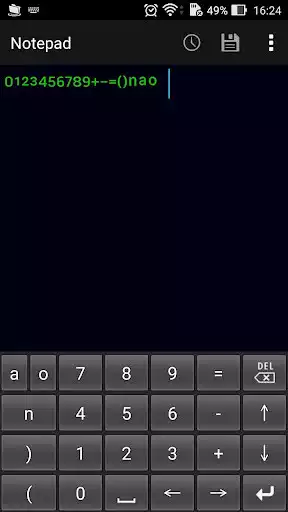
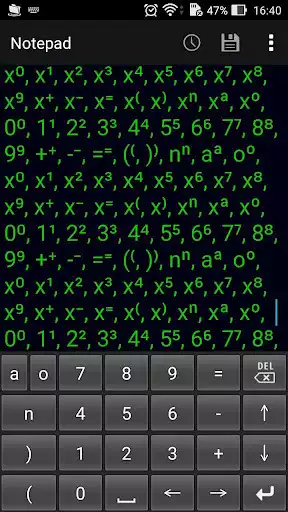
This is a soft keyboard which can input "superscript number" used to use for expressing square or cube, etc. in mathematical equations at one touch.
Please enter ordinary numbers and alphabets with other keyboards.
Please be aware that it may not be saved correctly depending on the character code of the text file to be entered.
If it is UTF-8 of the standard character code of Android OS it can be saved correctly.
There is a possibility of garbled characters when saving with the standard character code of Windows PC.
Enabling Keyboards
01
Go to Settings > System > Languages & input > and tap Virtual keyboard in the Keyboard & inputs section.
02
You'll see a list of each keyboard you've installed.
Tap "Manage keyboards".
03
Toggle on the new keyboard.
You might see a warning that this input method may collect the text you type including personal information.
But this app does not collect any input content.
This is not a warning specific to this application, it will always be displayed if you select a character input application other than the keyboard that is standard on the device.
If you're satisfied with the explanation, tap OK.
Note: Instructions will vary depending on your Android OS.
Switching Keyboards
01
Launch the app you want to type in.
02
Tap to bring up the keyboard.
03
Tap the keyboard icon on the bottom right.
(On some devices this icon isn't present, in that case pull down the notification bar when a keyboard is active.)
04
Choose the keyboard from the list that pops up.
Enjoy with UptoPlay the online game Superscript numeric keypad.
ADDITIONAL INFORMATION
Developer: hosinoatusi
Genre: Productivity
App version: 1.0
App size: 38k
Comments:
i tried every setting imaginable after enabling this keyboard in settings, but i could never get it to appear on my Pixel 3 with Android Pie. If someone can post some very explicit directions, I am prepared to try again, but for now i have refunded it. Update: several android articles later, I think I have found this out. Will repurchase permanently. Final update: works great! Raised to 5 star!
My smartphone is a model whose soft keyboard can be switched easily and quickly. I like this one, which is easier to press with only a small number of superscripts, than the one that is difficult to press with a small key like the other soft keyboards, which is difficult to press with various symbols.
Works okay but unlike other keyboard apps, it doesn't appear in drawer. Has to be enabled via settings. Small footprint.
Does nothing. File size 92k downloads in the background of phone with no icon. Seems to be malware. Donot download.
Looks great, but not functional replacement with other keyboards.'
Page navigation: