


Annual Diary

Annual Diary
The official app & game
Distributed by UptoPlay
SCREENSHOTS

DESCRIPTION
Use UptoPlay to play online the game Annual Diary.
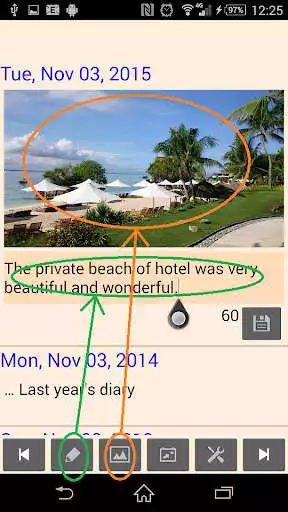
This is a simple photo diary app.
It makes you can look back the past diary easily.
<<<< Features >>>>
- You can look back the past diary of same date(yearly/monthly/weekly) by scroll any years.(up to Out Of Memory)
- The previous day / next day of the diary will be moved in the horizontal swipe like turn the page.
- You can search the diary that includes a specific string, and you can browse them by scroll to the order.
- A diary of a day can contain any number of texts and images.
- You can configure color, text size, date format, etc.
- You can lock out this app by password.
- Photos are copied to diary data. So, the photo does not disappear if you delete the original photo data.
- Diary data are saved as text files and image files on hidden folder [.Annual Diary].
(You can backup the diary data to cloud services automatically by sync apps. e.x.'FolderSync' )
<<<< Operations >>>>
- You can add text and photos to any date by tapping the date portion.
- You can slide to the previous/next date with the arrow button or swipe the screen.
- You can move to any date by the calendar button.
- You can add a text/image by a single action of the pen button / image button if the recent date, such as when writing a daily diary.
- You can re-edit by tapping the saved sentence.
- You can delete or rotation by tapping the photo.
- String search will launch by long press of the arrow button.
- You can scroll all the diary in chronological order by searching no text.
- You can return to today by long press the calendar button.
- You can switch the display of the past diary yearly/monthly/weekly by long press the setting button.
Enjoy with UptoPlay the online game Annual Diary.
ADDITIONAL INFORMATION
Developer: annual-diary.com
Genre: Lifestyle
App version: 5.05
App size: 1.8M
Recent changes: Avoid delays due to writing files at startup
Comments:
App options are very limited
The developer does not provide a way to back up your data or transfer it to another device. I've asked several questions of the support email team and they simply say that it is in a hidden folder and that I to find an app that will allow me to find it. They put the data in a hidden folder and to not provide you a way to copy that folder or to change where you want that folder to be saved. Why would anyone want an Annual Diary that can is only useful until you change phones or have to do a factory reset? It would be 5 stars if it were useful for more than one phone."
Page navigation: