


Navigraph Charts
Navigraph Charts
The official app & game
Distributed by UptoPlay
SCREENSHOTS
DESCRIPTION
Use UptoPlay to play online the game Navigraph Charts.
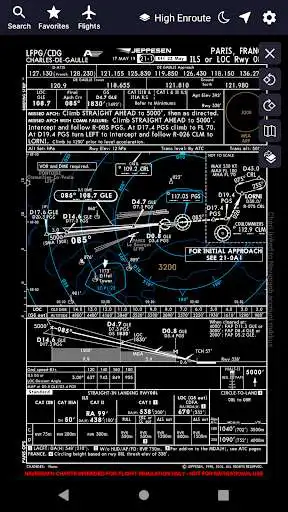
Are you into flight simulation? Navigraph Charts is the preferred charts app in the flight simulation community offering the largest coverage available of Jeppesen charts updated continuously every 28 days following the AIRAC cycle.
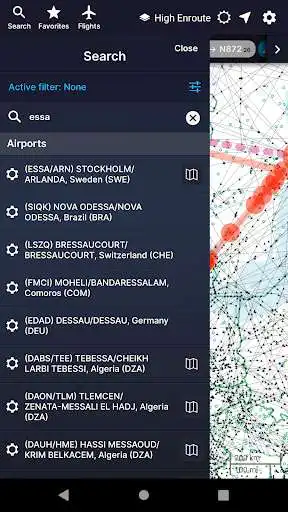
Navigraph Charts allows you to search, view and organize airport charts from 6,800 airports around the globe. You can connect it to FSX, Prepar3D or X-Plane, to plot your position on charts, or use it independently to plan your route.
Navigraph Charts contains the following features:
- Worldwide and current Jeppesen IFR charts: 6,800+ airports covered (requires Navigraph subscription)
- Moving maps: connect to X-Plane, FSX and Prepar3D to show the simulator's aircraft position on the charts in real time (requires Navigraph Simlink on simulator computer)
- Night mode: Dark theme version of the charts for low ambient light conditions
- Route calculation: Automatically calculate a route between any airport pair directly in the app
- SID and STAR visual overviews: View airport procedures overlaid on the enroute chart for better understanding of the airspace and more straightforward flight planning
- Flight organization: Interactively display the flight's route on the enroute chart, and collect charts for departure, destination and alternates in a single place
- Chart overlays: Overlay SID, STAR and approach charts on the enroute chart for easier transitions between different envelopes of the flight and for increased situational awareness
- Chart color coding and pinboards: Easily filter specific chart types and pin charts for quick access
- Interactive enroute charts: Click and search airports, waypoints, navaids, airways, controlled and restricted airspaces, FIRs/UIRs, holding patterns and more
- Flight plan import: Import flight plans from SimBrief and other external route calculator tools
For the ultimate experience we recommend subscribing to Navigraph Ultimate which ensures that you are always flying using the most recent charts and navdata used by all online pilots and air traffic controllers in the flight simulation community.
Navigraph Ultimate includes, in addition to worldwide charts access, updated navdata parsed into more than 120 different addon formats including aircraft like PMDG B737/747/748/777, Qualitywings B787, Flight Factor A320, IXEG 737 and many more. Navigraph Ultimate also includes regular updates to the navigation databases in flight simulators such as X-Plane 11.
Please note that:
- This product is for home flight simulation use only and must not be used for real world navigation
- This product is free to use in demo mode but requires a Navigraph account
- This product requires a Navigraph Charts or Navigraph Ultimate subscription for full access to all airport charts
Pro tips:
- We recommend that you install Navigraph Charts on your desktop too. All changes you make to Flights, Favorites and Pinboards are immediately reflected on your tablet
- With a current Navigraph Charts or Navigraph Ultimate subscription you can also access airport charts in the virtual Electronic Flight Bag (EFB) on the virtual flightdeck of many addon aircraft
Enjoy with UptoPlay the online game Navigraph Charts.
ADDITIONAL INFORMATION
Developer: Navigraph
Genre: Tools
App version: 7.0.3
App size: 16M
Recent changes: Crash and stability fixes
Comments:
Extremely buggy and unusable. Most of the time the buttons do not work. Search keeps loading endlessly. Flightplan creation does not work, the window just closes. The desktop version works perfectly fine, it's a shame that the devs do not support the Android app. Experience based on using on a Microsoft Surface Duo in traditional single screen as well as spanned dual screen mode.
The service works amazing but the app is terrible. I can't load flights or import from SimBrief, and I can't get any charts to pull up. Everything works on my sim and NaviGraph Charts on Windows.
It is a shame I cannot give this a better review, because there clearly has been a lot of development time put in and when it works it is beyond good. The problem is, it doesn't work more than it works. At least on my Android 9 device (Samsung S8+). It crashes left and right. Seems to be related to the device locking., as most of the time it locks is when it crashes. Probably isn't developed with a full understanding of the Android application/activity lifecycle, and not handling pause/resume correctly. If it weren't for this, I'd rate it 5 stars.
I would like to say A+ job!!! The old version was "just ok" however this new updated version is WAY WAY WAY better!!! I am loooooooving the new version!!! *** I would like to see an option "drag & drop" for waypoints on the route line ( in NEXT update )... and a confirmation of closing app ( if you accidentally back out of the app it will close without confirmation) *** With those options it would make it a A++ or 5 star
Very buggy but looks good on Surface Duo. The app seems to span well across both screens with very little UI in the center thus behind the hinge. And when you open the Flight tab it opens on the left screen instead of in the center, which is great, again, as it is not blocked by the hinge. The only issue is that it is very buggy and doesn't load flight plans from SimBrief or open charts. Sad to see that it was last updated in 2019. It has so much potential to be great."
Page navigation: