


GFX Tool for PUBG BGMI
GFX Tool for PUBG BGMI
The official app & game
Distributed by UptoPlay
SCREENSHOTS
DESCRIPTION
Use UptoPlay to play online the game GFX Tool for PUBG BGMI.
GFX Tool is a free utility launcher for FPS games where you can fully customize the game graphics according to your desires for smooth gameplay experience.
GFX Tool Features
Android 11 Supported.
All Version Supported.
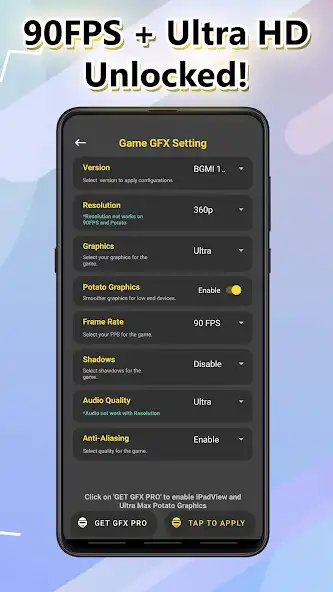
Change to any resolution.
Unlock HDR and UHD graphics in low end devices.
Unlock the upto 90 FPS.
Potato Graphics Support.
Fully control Anti-aliasing and shadows.
Unlock Ultra Audio Quality.
And much more other useful options.
All game versions are supported.
Accelerate Your Game Speed - Faster & Smoother
Get Super Fast Game Experience,
Clean up background apps to speed up RAM (random-access memory)
Push your device to it's maximum potential.
How to use our GFX Tool
Close game if its currently running before starting GFX Tool,
Choose your version of your game,
Customize the graphics according to your desires and device capabilities.
Once everything is set, click on Apply butoon and Run Game!
DISCLAIMER: This is an UNOFFICIAL application for specific games.This application is not associated in any way with other brands and developers.
If you feel that we have violated your intellectual property rights or any other agreement, please contact us by e-mail [email protected], we will immediately take the necessary measures.
Enjoy with UptoPlay the online game GFX Tool for PUBG BGMI.
ADDITIONAL INFORMATION
Developer: CornerDesk Inc.
Recent changes: ❤️ More Graphics smoothening and Fast Rendering
❤️ BGMI/PUBG 2.0 Official Support
❤️ Max Potato Graphics
-*-Bugs Fixed-*-
❤️ Security Patch Update June
Page navigation: