


Folder Camera (Notification bar)

Folder Camera (Notification bar)
The official app & game
Distributed by UptoPlay
SCREENSHOTS
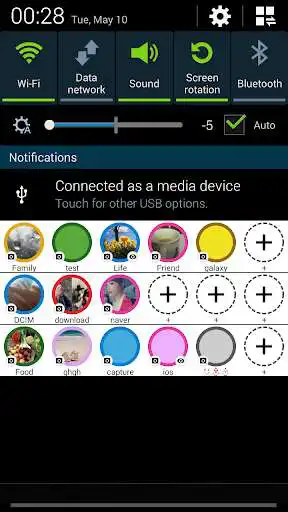
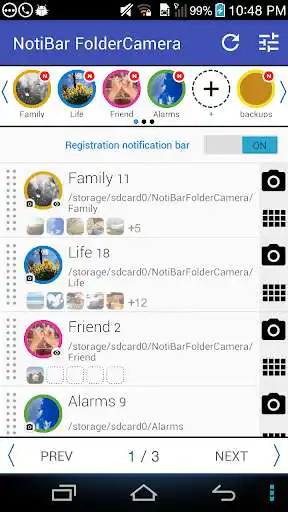
DESCRIPTION
Use UptoPlay to play online the game Folder Camera (Notification bar).
'NotiBar Folder Camera' is an integrated organizer of your life.
The smarter, faster, powerful, easier way to Photo management!
'NotiBar Folder Camera' is the most convenient photo management app for android.
Experience 'NotiBar FolderCamera'. Your life will be smart.
List of supported languages
English, Korean
We would appreciate it if you would contact us via the App in the
'Settings -> About -> Mail to developer'.
When taking pictures, please use the default camera app.
1. Create a folder to save your photos.
2. Launch the app and connect folders.
3. Add the Notification Bar folder.
4. Quit the app and drop the notification bar and select the folder.
5. When the camera is running, take a picture.
6. The pictures will be saved in the selected folder.
7. anywhere quickly take a picture, you can save to a folder.
Enjoy with UptoPlay the online game Folder Camera (Notification bar).
ADDITIONAL INFORMATION
Developer: FingerTory
Genre: Productivity
App version: 1.0.4
App size: 5.3M
Recent changes: -UI Improvement
-Bug fix
Comments:
I give 3 stars because we need an ad free version of this.. This is very good.. needs work on it but does a good job so far.
App is huge mess on Huawei P20 pro. I linked existing folder "work" with odd 200 pics in app settings. It started copying itself random pictures from random folders. Ended up with new 2200 photos renamed to work_xxxx_xxx. Spent hours sorting out!
After I deleted the folders in the App and refreshed it, everything came back.Also it does not make u unlimited folders, I cud make only a few.
please link to camera to folder auto move, not app to camera
Doesn't work. Just crashes"
Page navigation: