


Colorista

Colorista
The official app & game
Distributed by UptoPlay
SCREENSHOTS
DESCRIPTION
Use UptoPlay to play online the game Colorista.
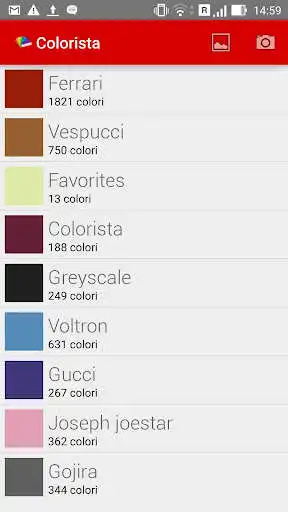
Colorista is a simple utility that lets you catch the palette of dominant colors in a photo taken with your smartphone or tablet camera.
It is dedicated to creative people such as designers, web developers, architects, stylists and everyone who works with colors.
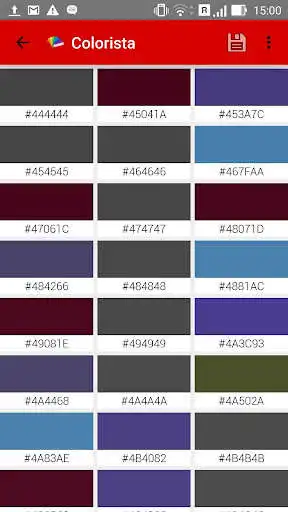
Version 1.6.0 begins a transition to material design, provides RGB, CYMK HSV color space information for each color of the extracted palette.
It also shows the color hexadecimal notation commonly used in HTML code.
Save palette feature and delete it with a swipe gesture (you can also undo deletion)
You can add colors to the Favorites custom palette!
Share a color with GMail, G+ Instagram, Facebook, WhatsApp, Snapchat and other apps!
Main color of a palette can be chosen between all the palette's colors (long click on a color and save palette.
You can duplicate a palette by re-saving it with another name
Snap a photo, grab a color!
Enjoy with UptoPlay the online game Colorista.
ADDITIONAL INFORMATION
Developer: Andrea Castello
Genre: Productivity
App version: 1.6.2
App size: 1.2M
Recent changes: - V 1.6.1 Colorista uses material design. Bug fix
- V 1.5.3 small layout improvement and palette size in palette list
- V 1.5.1: NEW! It is possible to change the main color of the palette by long-clicking on the chosen one (it's the one displayed in the palette list).
* fixed bugs
- V 1.5.0 Share a color to other apps! Supported apps for sharing are: Instagram, G+, GMail, Twitter (hex code only), Drive, WA, FB Messenger.
* Loading from "recent" directory of KitKat phones is now supported.
Comments:
I love how this captures every color in a picture. However, I don't like how it saves the color palettes. It always saves the palettes by RGB. There are many times I've wanted to save the palette by weight, or at least have the option to sort the saved palettes by weight when viewing them.
Mast
Ok
Save Function Not Working. After selecting photo, when I try to save the pallet it doesn't work. The pallet is different when I go back in to it. It's filled with blank boxes with no colour just hex code. The occasional colour from saved pallet shows up, but they are in a bizarre order. Not helpful at all, to the point of uninstall :(
I've finally had a chance to play online this great application. I'll stay tuned for new features on it"
Page navigation: