


Video Compressor - Resize Multiple Videos MP4

Video Compressor
The official app & game
Distributed by UptoPlay
SCREENSHOTS

DESCRIPTION
Use UptoPlay to play online the game Video Compressor - Resize Multiple Videos MP4.
BATCH VIDEO COMPRESSOR Free Compress/Resize Multiple MP4 Videos is the best free app to reduce the size of Multiple Videos at the same time and share directly to other apps.
Free Multiple Videos Compressor reduces the size of videos in MBs so to over come the limitations of file sharing through email or any other platform.
Choose/Record multiple videos at the same time
Set the output quality to specify the compression
Automatically reduces size of all the videos for Free
Share videos through email or any social media platform
Automatically saves compressed video in the App Gallery
Batch Video Compressor is an easy to use app that allows users to compress/resize MULTIPLE VIDEOS at a time. Now you dont have to worry about resizing the videos through some intimidating software. All you need to do is play online Batch Video Compressor which resizes multiple videos for you at the same time to the video quality of your choice.
It is a simple video compression utility that make the videos sharable on different platforms without worrying about the data and saving them to local storage automatically.
All the social media platforms have set a certain limit to the size of video that you can upload on them. If you have a video size greater than the size limit, you will need to compress it in order to share it on WhatsApp or any other social media platform. To do so, the easiest way to resize multiple videos is through Free Batch Video Compressor.
Batch Video Compressor Automatically resize Multiple Videos at a time which you can share on any other app and saves it in devices photo gallery.
How to Use:
- Open Batch Video Compressor Resize Multiple Videos in your android device.
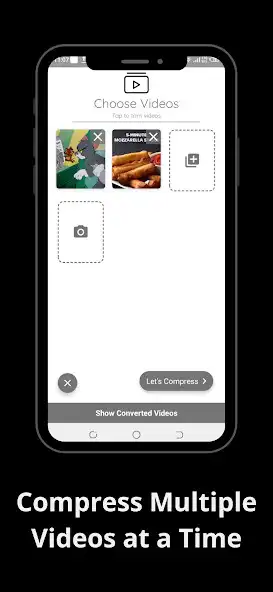
- Tap on Gallery button to select MULTIPLE VIDEOS from your devices photo gallery or tap on Camera to record video using apps camera.
After selecting or recording multiple videos to resize, tap Lets Compress to start automatic compression of videos.
- Select the desired video quality from the three given options, Low, Medium, and High Quality.
- App will automatically start batch videos compression. Wait for the app to finish resizing the selected videos.
- You can now preview the compressed video, tap Share given on the top right corner of the apps screen to share individual video on other social media platforms. You can also share batch resized videos on other apps by tapping Share all.
- Tap Show Converted Videos to view all the resized videos till time.
- Thats all you need to do in order to compress multiple videos efficiently.
Simple application for reducing the size of the videos to share through different platforms when using limited data. It works in complete offline mode and saves a lot of time.
Note: Choosing high quality might sometimes increases the size of the videos as it will provide output in best possible quality. In some cases when the app fails to compress videos in low quality. try using medium compression, it is because the video is already optimized and can not be further compressed.
Enjoy with UptoPlay the online game Video Compressor - Resize Multiple Videos MP4.
ADDITIONAL INFORMATION
Developer:
Recent changes: Languages Added Afrikaans, Arabic, German, Italian, Polish, Spanish
Page navigation: