


Next 3D Theme Green Twister
Next 3D Theme Green Twister
The official app & game
Distributed by UptoPlay
SCREENSHOTS
DESCRIPTION
Play this online game named Next 3D Theme Green Twister .
Next 3D Theme Green Twister is nextlauncher,theme,xogreentwister,personalization,twister,green, content rating is Everyone (PEGI-3). This app is rated 5 by 2 users who are using this app. To know more about the company/developer, visit DimensionX website who developed it. com.xo.nextlauncher.theme.xogreentwister.apk apps can be downloaded and installed on Android 4.1.x and higher Android devices. The Latest Version of 2.0.6 Available for download. Download the app using your favorite browser and click Install to install the application. Please note that we provide both basic and pure APK files and faster play online speeds than APK Mirror. This app APK has been downloaded 1100+ times on store. You can also play online com.xo.nextlauncher.theme.xogreentwister APK and run it with the popular Android Emulators.
Please read the "Directions" before buying completely.

Features ( Next Launcher "3D" Theme: Green Twister)

Note: we have other colors available.

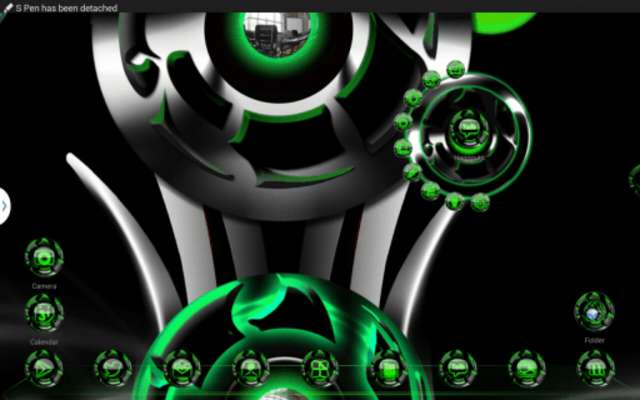
• 2D (Normal) and 3D Modes (as shown in pics)

• Over 2103 custom HD Icons (HD=Tablet Compatible)

Note: 20 special icons, covers the main apps of the phone such as dial, SMS, Playstore and so on. The other special icons must be set manually.

• 26 HD custom ultra high definition wallpapers

(19 is on our cloud - use our app to set wallpaper please)

• High End Design for all elements down to little indicator.

Directions:

This is a highly customizable theme for Next Launcher 3D.

Please make sure that you have purchased and installed the latest version of the Next Launcher 3D.

Installation in 2D normal classical mode

1. Open Next Launcher 3D

2. Press menu on your desktop

3. Select Theme in Menu

4. Select "Installed"

5. Select theme Green Twister and Apply

 Change to 3D mode

1.  Open Next Launcher 3D

2.  Press menu on your desktop

3.  Select "Preferences"

4.  Switch to "3D mode"

Select Theme in 3D mode

1.  Press Menu on your desktop

("Menu" also the 5th button on your dock on your desktop)

2.  Select "Theme"

(the button looks like a T-shirt)

3.  Select "Installed"

4. Select Green Twister 3D and Apply

Change wallpapers:

1.  Open my application, Choose Wallpaper

 How to open my app (Method 1)

1.  Open Google Play app

2.  Select "Menu" > "My App"

3.  Scroll down until you see my app.

 How to open my app (Method 2)

Alternatively, in Next Launcher:

1.  Select Menu> Add> Shortcut

2.  Scroll down until you see my app.

Troubleshooting:

1.If you don't see the theme, try the following:

- Close Next Launcher 3d

- Open it again.

- Apply any Default theme

- Follow Installation for 2D mode direction above again.

- Follow Installation for 3D mode after.

2.  Why not all icons are applied?

Icons can be manually applied at this time due to Next Launcher limitation.

SOCIAL

Visit our Google+ page or Facebook page for all of our themes.  Join our community for more experience to get the latest themes and news.

•  My Google Community:  http://goo.gl/9PQYdb

•  Google Plus:  https://plus.google.com/+MichaelAXoThemes/posts

•  Facebook: http://www.facebook.com/xothemes

•  Website:  http://www.xothemes.com (see screenshots)

•  Twitter: http://www.twitter.com/@xo_studio

Sincerely,

Michael A.

DimensionX and XOTHEMES

Next Launcher 3D Theme Green Twister

This theme is not affiliated with next launcher theme maker nor zt.art
Updates:
- Added 1001 HD icons, Optimize file size, corrected app filter, added new set of cloud-based wallpapers.
Next 3D Theme Green Twister from UptoPlay.net
Page navigation: