


Custom AOD (Add images on Always On Display)
Custom AOD (Add images on Always On Display)
The official app & game
Distributed by UptoPlay
SCREENSHOTS
DESCRIPTION
Use UptoPlay to play online the game Custom AOD (Add images on Always On Display).
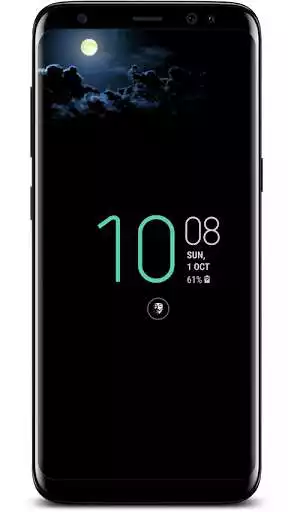
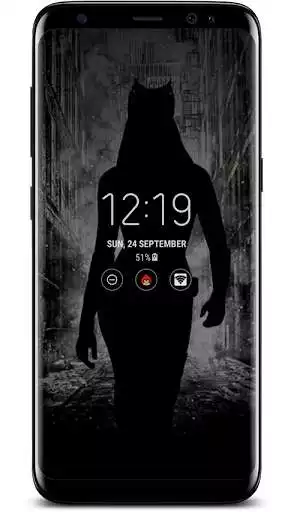
Add sticker/Wallpapers/Images to your Always On Display/Ambient Display screen. 1000+ images for your Always On Display and Ambient Display
Customize your always-on screen.
***Note***
This app only adds images/Text on Samsung's Always On Display, Google Pixel's Ambient display, One Plus 7 Ambient display.
Devices
Samsung Galaxy S7
Samsung Galaxy S7edge,
Samsung Galaxy S8/S8+
Samsung Galaxy S9/S9+
Samsung Galaxy S10E, S10, S10+
Samsung Galaxy A30, A40, A50
Samsung Galaxy Note 8,
Samsung Galaxy Note 9,
Samsung Galaxy Note 10/10+
Samsung Galaxy Note 20/20+
Google Pixel 3
One Plus 7
Do not worry about Screen burn
Half Pixel images used to prevent screen burn and battery draining issue.
Images move after some time ( Image move to next pixel so you can not notice movement, But they surely move).
Text shift position to TOP or BOTTOM to prevent screen burn.
Feature
>Add Images On Samsung's Always On Display.
>Set Custom Text to AOD screen.
>Add mood emoji to AOD Screen
>new images added regularly
>Option to select text colour
This app uses Accessibility services.
This app used Accessibility services to perform swipe gestures and to display the image on Always On Display screen. This app will not collect any type of user data.
Enjoy with UptoPlay the online game Custom AOD (Add images on Always On Display).
ADDITIONAL INFORMATION
Developer: Dhwani developer
Genre: Personalization
App version: 3.2.4 Beta
App size: 6.6M
Recent changes: -Now non-prime users can set the prime images every 3hrs by watching rewarded videos ads.
-minor bug fixes
Comments:
`Great concept however, can't upgrade in order to take advantage of uploading your own photos to create your own AOD. The presets are outdated and aren't very appealing. In order to have a "half pixel" image created, they charge $0.99 a pop. Im wondering if this is optimized for Android 11 because it hangs and acts buggy. If it worked as advertised, I'd purchase it (tried but it wouldn't even let me buy it!!) and I'm sure it would be worth it. I'll check back and if things are fixed, I'll try.`,I usually don't write reviews but this app was significantly irritating, you can only add a tiny sliver of an image without paying for the app (no, you can't adjust the proportions, at least not without paying), so basically anything taller than a penny is out of the question. To add insult to injury, once I finally made the picture small enough the app stuck it to the top border of the screen. I tried moving it but it wouldn't budge, so I gave up on that all together. Then, the clock is in this boring bold font and you can't change it, but you can select the font of random words and reminders, not helpful. I'd give it a lower score but I'm sure it works once you pay for it, annoying that it's advertisered as a free app but you can do barely anything without paying and I'd rather not encourage this kind of behavior.
Working flawlessly on my US/Verizon Samsung Galaxy S10+ SM-G975U on Android 10. Apparently there has been some loss functionality from previous versions and I can't speak to that, but as it is constructed now it does exactly what it states without a single pick up or glitch and I'm very pleased Update: UPDATED: Oops! I spoke too soon. The very basic app functionality works well, but no sooner had I paid for the Prime version then the app began to crash regularly. First time selecting favorites, looks like having more than 20 or so is unstable. I also seems to crash and lose it's grip on the Accessibility settings when I have the auto-change function enabled. Of course storing my favorites and having it change them out for me is the whole reason to pay for the Prime version so I am very disappointed. If the devs can't get me rolling I'm going to have to ask for my money back I'm sad to say, because when it works it's pretty cool
This app works great on my phone, but does not work well with my phone. Before the update the AOD would time out when my phone was placed screen down, now it seems to stay on all the time. I like how it shuts down with my phones AOD scheduled on/ off times, just wish the app would not stay on the whole time my phone is wireless charging after the scheduled shut off time. It's an inconvenience to have to disable the app at night when charging and then turn it back on in the morning so I can use it
I was a little surprised to find this actually works on my Pixel. My significant other and I just bought the same phone and we're constantly mixing them up because they look identical. With this app, I can customize my always on display to add a small graphic. This allows us to differentiate our phones without picking them up all of the time."
Page navigation: