


HeadMob Tracker
HeadMob Tracker
The official app & game
Distributed by UptoPlay
SCREENSHOTS
DESCRIPTION
Use UptoPlay to play online the game HeadMob Tracker.
With HeadMob, you have the chance to maximize your immersive gaming experience as it tracks your head movements in all six degrees of freedom and transfer the coordinates with no delay to the game you are playing on your PC.
Compatible with any simulation games using OpenTrack or TrackIR
Adjust the sensitivity and offset of each axis
No expensive headset, glasses, or extra hardware is required
Connects over WiFi, no need for annoying cables
All tracking computations are performed on phone
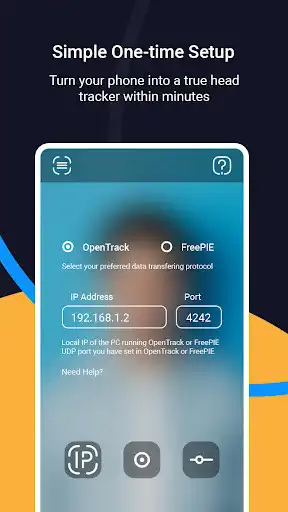
Simple one-time setup
Short list of games compatible with HeadMob
- Microsoft Flight Simulator
- Star Citizens
- IL-2 Great Battles
- War Thunder
- Star Wars: Squadrons
- Arma 2/3
- Rise of Flight
- IL-2 Cliffs of Dover
- Flight Simulator X
- Assetto Corsa
- Euro Truck
- Elite: Dangerous
- Project Cars
And any game that supports FreeTrack or TrackIR protocol
Instructions
On your PC:
1. Download & Install OpenTrack (https://git.io/JUs2U) on your PC and make sure you give it network access when asked by the Windows Firewall
2. In OpenTrack, select "UDP over Network" as input source and "FreeTrack" as output
3. Your PC setup is done
On your phone:
1. Tap the IP icon in HeadMob and enter the local IP address of your PC and a proper port number regarding OpenTrack or FreePIE
2. Start the app and you are ready to dive into the game!
Detailed instructions available in the app
______________________
NOTE: HeadMob works on devices that support Google AR services
If you have any problem during the usage of HeadMob, don't hesitate to contact us via [email protected]
Enjoy with UptoPlay the online game HeadMob Tracker.
ADDITIONAL INFORMATION
Developer: Pyrobees
Genre: Tools
App version: 1.0.0
App size: 14M
Comments:
Best facetracking ive used out of tons of paid 'pro' solutions thats require a spotlight on your face and still lose tracking. At least with a good front camera this app tracks me in near darkness. Also way less jittery than most, even in low light situations the jitter is minimal. Only complaint that is if you rotate your phone it automatically compensates for the rotations but not the yaw offsets so you gotta set some axis' manually. Also only one ad when you start it in the free version.
It's really good.
Best one so far ⚡'
Page navigation: