


RoboteQ Motor Control Utility

RoboteQ Motor Control Utility
The official app & game
Distributed by UptoPlay
SCREENSHOTS
DESCRIPTION
Use UptoPlay to play online the game RoboteQ Motor Control Utility.
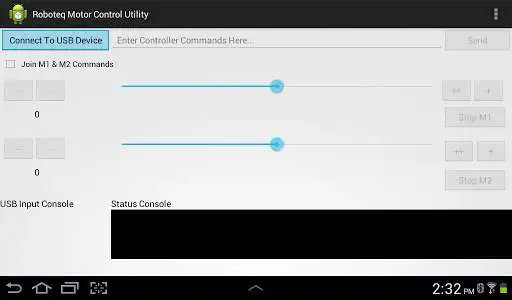
This is an Android powered motor control utility for the RoboteQ MDC2250C motor controller. Connect your Android device to the MDC2250C USB port. Provides a subset of features found in the RoboRun Utility including:
1. Sliders controls for M1 & M2 channels with Join option
2. Small and Large increment/decrement buttons
3. Application status text
4. USB input from motor controller output text window
5. Send console commands to motor controller
Directions
1. Connect USB cable from Android device to RoboteQ MDC2250C motor controller USB port
2. Start RoboteQ Motor Control Utility Android App
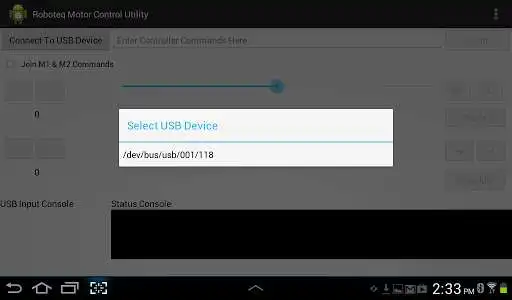
3. Click the "Connect To USB Device" button
4. Select attached RoboteQ motor controller USB port from the selection drop down popup dialog menu
5. Click "Ok" on the Allow USB access popup dialog menu. Status Console will display connection status (success/fail)
6. Control motors using the slider controls, increment/decrement buttons or console commands
7. USB Input Console will display reply messages from the RoboteQ MDC2250C motor controller
8. To reset the USB connection or application return to step 3
* This app was tested using a Samsung GT-P3113 7" Tablet with a Samsung USB Connector (Model: EPL-1PLOBEGXAR) and the MDC2250C RoboteQ motor controller. Unknown if this configuration works with any other Android tablet or RoboteQ motor controller.
Enjoy with UptoPlay the online game RoboteQ Motor Control Utility.
ADDITIONAL INFORMATION
Developer: Black Magic AI
Genre: Entertainment
App version: 1.0
App size: 237k
Recent changes: Initial release
Page navigation: