


Remote System Monitor

Remote System Monitor
The official app & game
Distributed by UptoPlay
SCREENSHOTS
DESCRIPTION
Use UptoPlay to play online the game Remote System Monitor.
Follow me on Twitter: https://twitter.com/trigonesoft
Follow me on Facebook: https://www.facebook.com/trigonesoft/
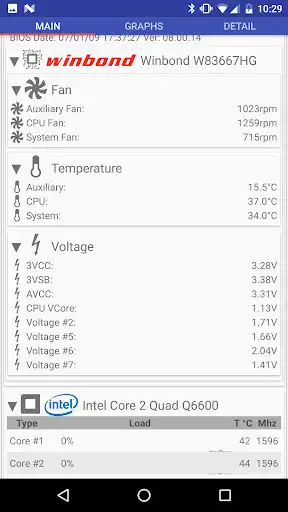
Remote System Monitor allows to get advanced system and hardware information from your windows computer over the network.
Remote System Monitor is composed of an Android application to display system information and a server software for Windows PC. Get Windows server software at https://www.trigonesoft.com/download.html
It is particularly useful to check your system state while playing games, allowing you to know if the computer is overheating, how your system deal with temperature and fan speed and how your games are using your computer resources (CPU, GPU, memory, etc..).
System and Hardware Information Provided are:
- 3D games frame rate
- temperatures (cpu/cores, gpu, motherboard, hard drive)
- cpu and gpu load
- cpu and gpu frequencies
- ram, swap and video memory usage
- voltages (system, gpu)
- advanced sata and nvme SSD information
- physical disks read/write speed
- fan speed (cpu, gpu, motherboard, etc...) and fan control
- network cards download/upload speed
- logical disks usage
- various controls and levels (fan, ...)
- liquid cooling flow
etc...
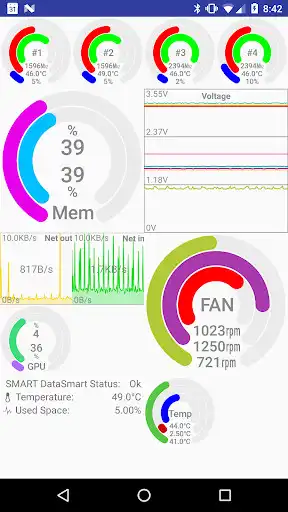
New Custom Dashboard with:
- multi-server support
- gauge widget
- graph and multi graph widget
- local notification widget
- etc...
For more information and help: http://www.trigonesoft.com/
Enjoy with UptoPlay the online game Remote System Monitor.
ADDITIONAL INFORMATION
Developer: TRIGONE
Recent changes: Improve the information displayed about servers which can or must be updated, and the app which must be updated.
Page navigation: