


MyParadise Outdoor Transformer

MyParadise Outdoor Transformer
The official app & game
Distributed by UptoPlay
SCREENSHOTS
DESCRIPTION
Use UptoPlay to play online the game MyParadise Outdoor Transformer.
Introducing MyParadise App; your new PERSONAL OUTDOOR LIGHTING MANAGER!
Compatible with our 200 Watt Wi-Fi transformer - GL33210. This app lets you control your garden lighting system on your smartphone from the comfort of your home.
Features:
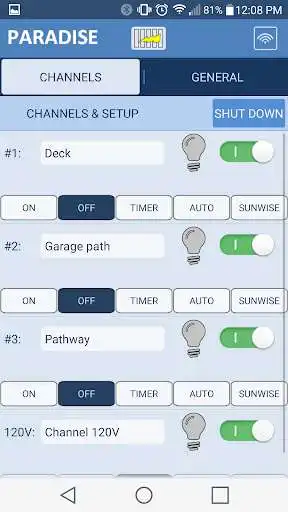
- Wattage load indication
- Name your 12V and 120V channels
- Control from up to 50 feet
- Light indicators to tell you if the lights are On/Off
- 5 settings for each channel: On, Off, Timer, Auto, Sunwise
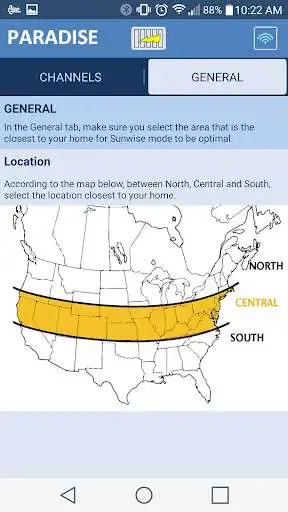
- Easily set your location by clicking on the map
- Shut down the transformer from a distance
- Intuitive interface for an easy control over your garden
To synchronize your smartphone with your transformer, open the App and follow the steps, or see the instruction manual on page 7.
Create a Paradise for your home!
Enjoy with UptoPlay the online game MyParadise Outdoor Transformer.
ADDITIONAL INFORMATION
Developer: Northern International Inc.
Genre: Lifestyle
App version: 1.2
App size: 2.1M
Recent changes: Added compatibility with latest android version.
Comments:
This was actually super easy to use. I don't understand why all the complaining. How many times do you need to set your lighting scheme? I connected via Wi-Fi, set my time on and off. The AP set almost every other parameter including the time and then I disconnected back to my normal Wi-Fi.
Unit is not connect to router. Doesn't usually connect or stay connected if it finally does. Worthless
Followed steps exactly as explained everything went fine the app would not connect even though my phone was. Worthless
`I don't mind it doesn't connect to my home wifi via cloud for security reason. I tested it on Google Pixel 3, here is the trick - YOU NEED to Enable Flight Mode on your phone, then Turn ON WIFi. Next, follow the annoying instructions on the unit "Mode+Down, then Up, Enter". On your phone, search for WIFi "Paradise_XXXXXX" connect using "12345678" as password. Your app will connect. If you don't use Flight mode, it will connect to LTE instead of WIFI and the app will fail to connect. Stupid.`,Should work off home wifi. Switching back and forth between home wifi and timer wifi is a pain. Wifi signal is weak. Cant control lights when I am not home. Everything else works fine.'
Page navigation: