


DroidMote Client
DroidMote Client
The official app & game
Distributed by UptoPlay
SCREENSHOTS

DESCRIPTION
Use UptoPlay to play online the game DroidMote Client.
TO CONTROL THE OTHER DEVICE, YOU MUST INSTALL THE SERVER APP ON IT.
DROIDMOTE SERVER IS AVAILABLE FOR ANDROID, WINDOWS, LINUX AND CHROME OS.
DROIDMOTE SERVER FOR ANDROID
https://play.google.com/store/apps/details?id=org.videomap.droidmoteserver
DROIDMOTE SERVER FOR LINUX, WINDOWS AND CHROMEOS
https://www.videomap.it/download.htm
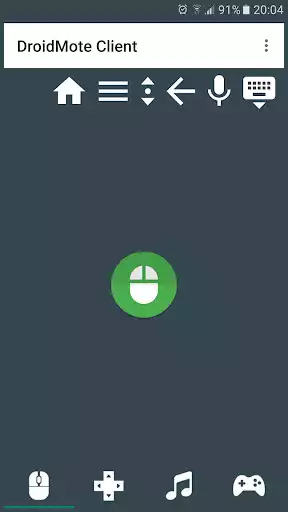
Control your Android, Windows, Linux or Chrome OS device from the comfort of your couch. This is the client part and can be installed on your Android device to control another device. Moreover, with DroidMote, you can use all multi touch applications and games , even on devices that do not have the touch screen ( e.g. when connected to a TV ! ).
QUICK START GUIDE
https://goo.gl/9pTzS
HOW TO USE DROIDMOTE - VIDEOS
https://goo.gl/as2eKY
MULTI TOUCH GAMES ON TV WITH AN HARDWARE CONTROLLER OR WITH YOUR PHONE AS CONTROLLER ARE NOT A PROBLEM !
IN THIS YOUTUBE PLAYLIST, FOR EACH MULTI TOUCH GAME CONTROLLED WITH DROIDMOTE, YOU CAN FIND A TOUCH PROFILE IN THE VIDEO DESCRIPTION.
https://goo.gl/3QuHDK
FOR SUPPORT AND INSTRUCTIONS
Telegram: https://t.me/droidmote_support
Forum: https://www.videomap.it/forum
DroidMote emulates hardware input devices in the Android, Windows and Linux OSes. Mouse, keyboard, multi touch trackpad, touch screen and a gamepad with 16 buttons and 6 axis. You can use the soft gamepad, an hardware gamepad or mouse and keyboard to play with all games installed on the server device, also those without the built-in gamepad support in virtue of the Gamepad2Touch functionality and the help of the touch profiles. Games that support hardware gamepads recognize DroidMote as an hardware gamepad. If you don't have a router, no problem. You can establish a connection point to point between the two devices with the function Tethering / portable hotspot of your device. (you do not need bluetooth, the bluetooth is slow and cover small distances)
YOU CAN PLAY MULTI TOUCH GAMES WITH YOUR PREFERRED HARDWARE GAMEPAD, ALSO WITHOUT A PHONE. YOU CAN CONTROL THE MOUSE WITH RIGHT STICK OF THE HARDWARE GAMEPAD.
https://goo.gl/zkYAvd
Feature:
Mouse
Air Mouse
Multi touch trackpad
Two fingers scroll rotate zoom
Keyboard
Media controls
Dpad
Controller for games
Supports multiple phones simultaneously
Two virtual analog stick
Touch emulation allows you to map buttons and analog sticks to the screen. Play all your favourite games with full analog support, even those without built-in controller support!
Touch Mouse for games that not support an hardware mouse
Voice dictation
Copy and paste from one device to the other
You can connect an hardware gamepad to your phone via bluetooth and play with multi touch games or games that require mouse and keyboard. The game can run on Android, Windows, Linux or Chrome OS.
Android TV compatible
If your Android TV box have a poor wifi, you can connect the box via ethernet cable.
YOU DON'T HAVE A ROOTED ANDROID DEVICE TO PLAY GAMES ? TRY THIS:
https://youtu.be/HuLy2ERDfmY
FOR ANY PROBLEMS, CONTACT ME BY EMAIL. I'M AT YOUR DISPOSAL 24 / 7
Enjoy with UptoPlay the online game DroidMote Client.
ADDITIONAL INFORMATION
Developer: Videomap
Genre: Tools
App version: 5.6.6
App size: 3.2M
Recent changes: All Servers free. And if you want, a single purchase in the Client to remove the ads. It will be valid forever and you will be able to control all Servers.
Full ChangeLog:
https://www.videomap.it/forum/viewtopic.php?f=3&t=6&start=180
Comments:
IT WORKS! Have more computers than input devices, but DroidMote solves it perfectly. DroidMote on Galaxy S6 to operate Linux desktop, just like using the phone itself, so easy! First startup after install server wouldn't connect, maybe because there was no mention of a password anywhere until I restart the server. After that, works great! Installed server on both computers so can connect to either at any time. Never drops connection, even when phone sleeps! Could use some more configurability options for the display/layout but not complaining. This app is worth a few dollars to get rid of the freakin ads it barfs out.
Was not able to connect with TV, even when the phone itself was connected via HDMI cable to the television. Still trying to find an app (like the one that comes with samsung phones) to use as a mouse when plugging my phone into the TV for a secondary screen
Works very well but when using with Windows or Linux sever without the paid version of this client, you will have to watch a 30 sec ad-video (which I feel is quite long) every time you connect or even re-connect a few minutes later. No ad when using the paid Android Server.
Running server found, but routinely won't connect. **Edit ** Looks like the issue was system notifications for this app were disabled somewhow- as soon as enabled again, things started working normally. ** Edit 11 Feb 2020 ** Now reports that no longer recognizes license, and won't connect again despite server and client being g on same wifi network, and no 4G. I paid for app and now am subjected to ads,
It is one one of the app which did worth rooting my android tv. Loved the app and functioning no issues, tho I will suggest few things to add cherry on top. i.e. if it is possible to add an option for pasting clipboard content straight away and launching apps directly from the client app, it will be an perfect app then :)'
Page navigation: