


CrazyBalls Go LauncherEX Theme

CrazyBalls Go LauncherEX Theme
The official app & game
Distributed by UptoPlay
SCREENSHOTS
DESCRIPTION
Play this online game named CrazyBalls Go LauncherEX Theme .
CrazyBalls Go LauncherEX Theme is launcherex,theme,crazyballs,personalization,golauncher, content rating is Everyone (PEGI-3). This app is rated 5 by 1 users who are using this app. To know more about the company/developer, visit Beautiful Droid website who developed it. com.gau.go.launcherex.theme.bms.crazyballs.apk apps can be downloaded and installed on Android 2.0.x and higher Android devices. The Latest Version of 1 Available for download. Download the app using your favorite browser and click Install to install the application. Please note that we provide both basic and pure APK files and faster play online speeds than APK Mirror. This app APK has been downloaded 67+ times on store. You can also play online com.gau.go.launcherex.theme.bms.crazyballs APK and run it with the popular Android Emulators.
Description

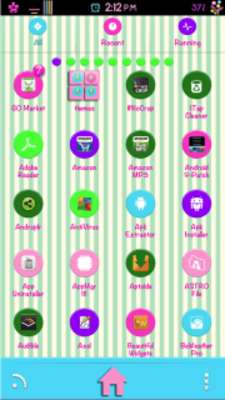
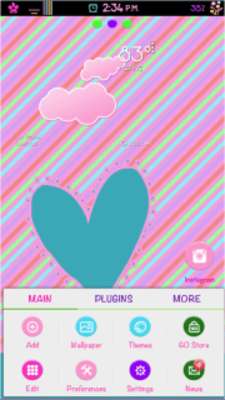
CrazyBalls Theme for GO Launcher Ex is a colorful fun theme, lots of icons and themed menus.

**TO SEE the theme after install, it MUST be applied using GO Launcher Ex (found in Google Play).

WHAT IS IN THIS Theme?

-Icons

-Home wallpapers

-App drawer wallpaper

-Drawer top tab panel

-Drawer bottom tab panel

-Folders

-MENU

To apply the theme:

1. Download Go Launcher EX from Google Play Market if you don't already have it

2. Press menu on phone

3. Press "themes"

4. Press the theme "CrazyBalls" and apply

To change the wallpaper:

1. Press Menu

2. Press Wallpaper

3. Press Wallpaper GO.

4. Press Wallpaper that you like

To change the icons:

1. Press and hold icon where you want to change icon

2. Press "Replace"

3. Press icon that you like
Updates:
CrazyBalls Go LauncherEX Theme from UptoPlay.net
Page navigation: