


BlueMotion Logger

BlueMotion Logger
The official app & game
Distributed by UptoPlay
SCREENSHOTS
DESCRIPTION
Play this online game named BlueMotion Logger .
BlueMotion Logger is mems,bluemotionlogger,productivity,bluemotion,logger, content rating is Everyone (PEGI-3). This app is rated 5 by 1 users who are using this app. To know more about the company/developer, visit STMICROELECTRONICS website who developed it. com.st.mems.bluemotionlogger.apk apps can be downloaded and installed on Android 2.2.x and higher Android devices. The Latest Version of 1.0 Available for download. Download the app using your favorite browser and click Install to install the application. Please note that we provide both basic and pure APK files and faster play online speeds than APK Mirror. This app APK has been downloaded 82+ times on store. You can also play online com.st.mems.bluemotionlogger APK and run it with the popular Android Emulators.
The BlueMotion Logger application from ST allows your Android device to interact via Bluetooth with the STEVAL-MKI109V2 plus STEVAL-MKI115V1 demonstration kit (eMotion motherboard and Bluetooth extension board – see www.st.com/mems for details) and all supported MEMS motion sensor adapter boards. You can easily set up sensor configurations (operative mode, full scale and output data rate), access all the available registers, view the sensor outputs and log data in a text file for post-processing.
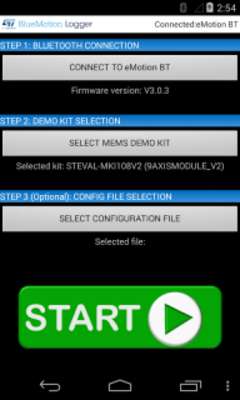
Simply pair the demonstration board with your Android device (PIN: 1234) and launch the BlueMotion Logger application. After launching the application you can establish the Bluetooth connection, select the adapter board from a list and also load the register configuration from a previously-saved configuration file.
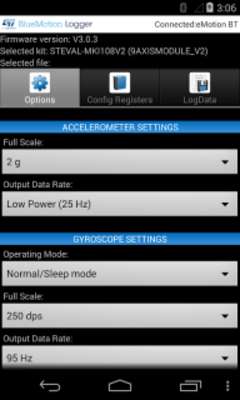
By clicking on the start button, data acquisition starts and a multi-tab page is displayed.
-	In the Options tab, you can set the full scale, the output data rate and the operating mode of the sensor.
-	In the Config Registers tab, you can read/write all the device registers and save the current register configuration (for easy re-loading in the future)
-	In the LogData tab, you can save the sensor output data stream to a text file and select the data to be stored.
Updates:
BlueMotion Logger from UptoPlay.net
Page navigation: