


Voice Changer Mic for Gaming - PS4 XBox PC
Voice Changer Mic for Gaming
The official app & game
Distributed by UptoPlay
SCREENSHOTS
DESCRIPTION
Use UptoPlay to play online the game Voice Changer Mic for Gaming - PS4 XBox PC.
Use Android as real-time voice changing microphone for Gaming - for use with OTHER devices: PC, PS4, XBox, external speaker, or another phone.
You CANNOT use with apps running on the SAME device (Discord, Skype or game apps). Reason: Android does not allow two apps to use mic at same time - and doesn't allow one app to send audio to another app.
High quality 14-voice voice changer can run in the background, and with screen off:
- Use as low-cost low-latency Noise Gate filter (remove low volume breathing sounds from live Podcasting/Broadcast with/without voice changing). Some voices benefit from Noise Gate as well (Venomous, Exterminator).
- Use with gaming headset with detachable mic, unplug mic and plug AUX to Android device
- PC gaming: Plug AUX from Android to PC line-in port
- PS4 gaming controller: use Android as USB mic (only up to Oreo 8.1), or use Y-splitter/AUX cable
- XBox gaming controller: need Y-splitter/AUX cable
- Cosplay: external speaker, or lapel mic/ext speaker (need Y-splitter)
- Mobile Gaming, Discord, Skype: output to another phone that runs game etc. (need Y-splitter)
- Phone Calls: output to another smart/dumb phone (need Y-splitter)
NOTE: Y-splitter is needed to convert TRS stereo output on AUX from Android headset port to mono input on headset port on PS4/XBox controllers or another phone. For PC line-in port, can just connect AUX cable directly from Android.
Click Help - Gaming/Cosplay for detailed instructions/diagrams/suggestions for Y-splitters, mics and speakers for Cosplay.
Usage
Plug in earphones and click Record (red buttton). Creates file AND outputs on earphones.
Click Live button (mic icon) to only output to earphones (NOT save to file).
Settings - Output Settings - Listen to Recording (Headset) setting is On by default. If headset/earphones are plugged in, it mirrors audio to that (make sure you plug in BEFORE you click Record/Live).
Force output: Sometimes Y-splitter/AUX cable are not recognized as "headset" - so click Settings - Output Settings - Listen to Recording (Always) and turn it On (it is off by default). Now audio will be played even if no headset is plugged in (there will be audio feedback/screeching sound!).
Voice Changer
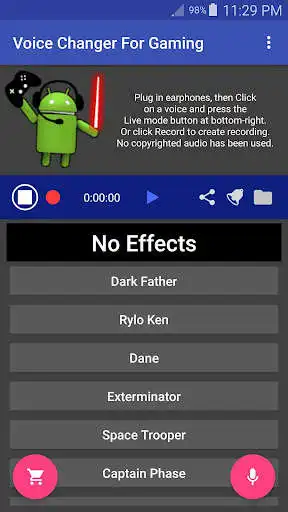
Instantly change voices, by clicking on a voice, or click No Effects for no effects:
- No Effects
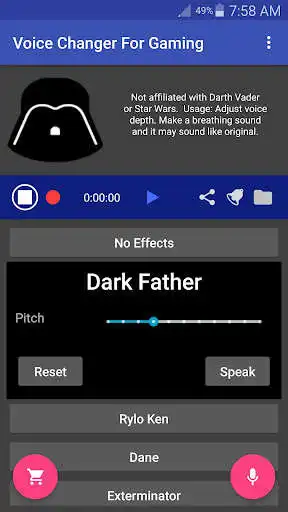
- Dark Father (not affiliated with Darth Vader)
- Rylo Ken (not affiliated with Kylo Ren)
- Dane (not affiliated with Bane)
- Exterminator (not affiliated with Daleks)
- Space Trooper (not affiliated with Stormtroopers)
- Captain Phase (not affiliated with Captain Phasma)
- Badman (not affiliated with Batman)
- Optimal Prime (not affiliated with Optimus Prime)
- Uldron (not affiliated with Ultron)
- P3CO (not affiliated with C3PO)
- Collum (not affiliated with Gollum/Smeagol)
- Smug (not affiliated with Smaug)
- Brog (not affiliated with the Borg)
- Venomous (not affiliated with Venom)
We disavow any and all affiliation with these character voices. They are the property of their respective owners. Using Dark Father, with some voice acting effort, you can mimic a voice that sounds like Darth Vader.
Each voice is individually customizable: You can create entirely new voices by simply adjusting the Pitch and Modulator settings for each voice! For example, you can use the Venomous voice to make a Lion's roar type voice.
Click Reset to reset settings for that voice, or click Settings - Reset Settings to reset everything back to default settings.
Press Speak button to listen to samples that were created with the app. No copyrighted audio samples have been used.
DISCLAIMER: no copyrighted audio is used by the app.
Click Contact to get help via e-mail.
Enjoy with UptoPlay the online game Voice Changer Mic for Gaming - PS4 XBox PC.
ADDITIONAL INFORMATION
Developer: StereoMatch
Genre: Music & Audio
App version: 0.10.78
App size: 6.9M
Recent changes: 0.10.78: Added 'Raw 2' option for Audio Source (for Android 7.0+). Updated help.
0.10.76: Added recording volume button.
0.10.75: Beta is now live! Update your ratings and reviews to make visible to public!
0.10.65: Improved voice changer Venomous (not affiliated with Venom). Made voices have similar volume. Improved Help - Gaming/Cosplay.
0.10.63: This is the first version of this app, so please send us feedback using Menu - Contact.
Comments:
This app isnt rated very well but it works just fine for me! not really a thing wrong with it I assume most people are just confused by it at first since it doesn't really give you any directions but once you firgure it out it just works fine haven't really had any major issues with it I like the rang of voice customization and auto leveling your allowed to do
Doesn't sound realistic. Same exact voices. Didn't realize this app technically wasn't a voice changing app.
Its sounds cool and all but it just needs more people in it. Thats it its a good game. Thanks!
Disclaimer: these do not sound exactly like the voices they resemble. If you want an exact voice modulator for a specific character, check out paid voice changers. However, if you're looking for close enough, or just something different from your own voice, this app gives plenty of options. I am thoroughly pleased by this app.
It was cool until you have to pay $10 to even talk for longer than 15 seconds. $10 for 14 voices and half of them sound pretty much the same. Maybe if you added more then I'd consider but for now no. 3 stars cause it was cool but I don't see myself paying to use like 3 or 4 voices for more than 15 seconds. It was fun while it lasted and it actually worked really convenient. So sad."
Page navigation: