


Monthly reminder
Monthly reminder
The official app & game
Distributed by UptoPlay
SCREENSHOTS
DESCRIPTION
Play this online game named Monthly reminder.
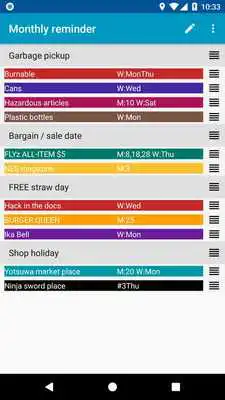
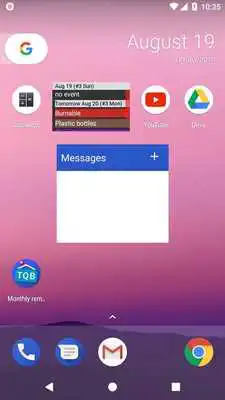
YOU KNEW IT but forgot the shop was closed today? Just remembered yesterday was a bargain at your favorite shop? Google Calendar is cool for reminding monthly events, but now your calendar has too many events to see? THIS APP SOLVES those troubles!You can register the day of the week of garbage pickup, bargain, shop holiday, sale date of book as monthly events, and can see them on your home screen as a widget. The widget can be 1x1 size; it saves your precious home screen space.
HOW TO USE
1.Place Monthly reminder widget to your home screen
2.Run the app, specify:
- Item name and its color
- The day(s) of every month (ex. 15th of every month)
- The day(s) of the week of every week (ex. every Friday and Saturday)
- Ordinal number(s) of the day of the week (ex. the second Monday and Wednesday of every month)
Header is useful for sorting items by category (header is not displayed on the widget). You can reorder the item by dragging the rightest tab. The area on the widget is limited; you can reorder items by priority so that you donot need to scroll down the list to see priority items. You can delete items by swiping it to left or right. After configuring items, save it and finish the app by "BACK" button on Android.
3.By exiting the app, the widget will have the updated contents.
COMPLEMENTAL INFO
The day and the ordinal number of the day of the week can be specified by comma and hyphen.
Ex 1) 5,10 .... 5th and 10th days
Ex 2) 15-20 ... from 15th to 20th days (continuos)
LIMITATIONS
You cannot specify an exceptional month. The setting is always enabled on every month.
FAQ
Q: What's "TQB" on app icon?
A: Try to say "TQB" to your Japanese friend and ask how it sounds in Japanese.
Updates:
v1.2 Added exporting/importing DB file feature* IMPORTANT NOTICE *
While updating the app with this update, the DB file will be deleted. Please backup the current DB file located on the following location:
/data/data/com.software.backcasey.tqbwidget/databases/tqb.db
If you have no way to backup the file, I am very sorry but please reconfigure each item as original DB manually.
Monthly reminder from UptoPlay.net
Page navigation: