


L Launcher -Marshmallow Launch

L Launcher
The official app & game
Distributed by UptoPlay
SCREENSHOTS
DESCRIPTION
Play this online game named L Launcher -Marshmallow Launch .
L Launcher -Marshmallow Launch is launcher,personalization, content rating is Everyone (PEGI-3). This app is rated 4.42 by 12 users who are using this app. To know more about the company/developer, visit LL App Group website who developed it. com.l.launcher.apk apps can be downloaded and installed on Android 4.0.x and higher Android devices. The Latest Version of 2.85 Available for download. Download the app using your favorite browser and click Install to install the application. Please note that we provide both basic and pure APK files and faster play online speeds than APK Mirror. This app APK has been downloaded 18008+ times on store. You can also play online com.l.launcher APK and run it with the popular Android Emulators.
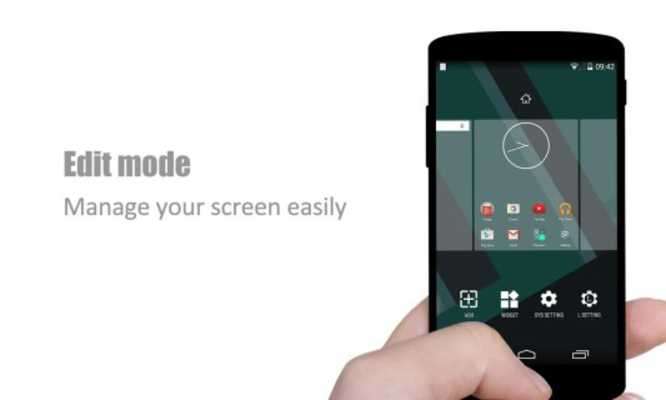
L Launcher, is the most polished, highly customizable native style launcher; Smooth, Cool, Rich features; Bring you the best Android™ 6.0 Marshmallow launcher experience!

L Launcher keep updating to Android 6.0 Marshmallow launcher experience, we had added Android M style drawer,  enable it in drawer menu if you want.


L Launcher main features:

1.  Based on Android Lollipop launcher, support for Android 4.0+ devices

2.  Support swipe right to Google Now; enable OK Google from all L Launcher screens(require Android 4.4+);

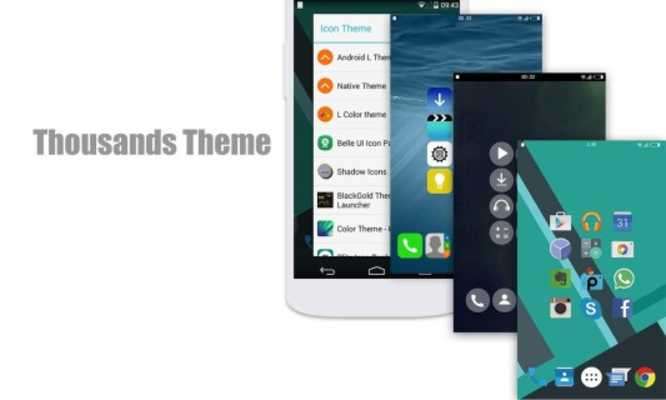
3.  Support icon theme, compatible with most icon packs

4.  Translucent status bar and navigation bar(for Android4.4 + devices and some supported devices, such as Galaxy S4, S5, S6, Galaxy Tab, etc )

5.  Transparent status bar clone for Android 4.0-4.3

6.  Handy Sidebar, and can drag-out Sidebar anywhere

7.  Drawer main features: Hide app, Create folders, Sort app, Quick A-Z bar

8.  Drawer styles: Horizontal, Vertical, Vertical with category

9.  Many Desktop and Drawer transition effect

10.  Many gestures and Dock icon gesture

11.  Unread Counts/Notifier for missed Call, unread SMS, Gmail and WhatsApp

12.  Icon Size Mode: Small, Medium, Large, Extra large

13.  Live wallpapers: parallax effect, blur, multi-wallpaper

14.  Backup and restore launcher setting and layout

15.  Import layout from other launchers

16.  Android M Marshmallow style drawer

17.  Highly customizable, 100+ options, below are some main options:

[Launcher Desktop:]

    + Set launcher desktop grid size

    + Set icon size, icon text size/color, hide icon text

    + Lock desktop option

    + Hide search bar, status bar

    + Desktop infinite scrolling; Wallpaper scrolling

    + Theme and icon pack support

[Launcher Dock:]

    + Multi Dock pages; Set number of Dock icons

    + Dock icon size

    + Hide Dock

[Launcher Drawer:]

    + Set launcher drawer grid; Set icon size, icon text size/color

    + Drawer folder

    + Background transparent

[Launcher Sidebar:]

    + Launch from everywhere

    + Quick toggle; Favorite apps, Recent apps

    + Have torch, cleaner and other handy tools

[Launcher Folder:]

    + Max rows and columns

    + Folder background; Folder preview style

    + Bulk add for folder

Permissions explaination:  Please refer to L Setting -- Help

Feedback: [email protected]

Android is a trademark of Google Inc.

❤ If you like L Launcher, Lollipop Launcher, please rate us and help to spread L Launcher;

If you meet error, please email us with detailed info, we will check and try to fix it ASAP, thanks
Updates:
- v2.85 update(2016-5-25):
1. Optimize booter, remove the one in sidebar
2. Remove drag down to search in drawer
3. Fix one crash in wallpaper setting
4. Optimize UI details
❤ If you like L Launcher, please rate us and recommend to your friends, thanks
L Launcher -Marshmallow Launch from UptoPlay.net
Page navigation: