


IntelliGrid Photo Stories

IntelliGrid Photo Stories
The official app & game
Distributed by UptoPlay
SCREENSHOTS
DESCRIPTION
Use UptoPlay to play online the game IntelliGrid Photo Stories.
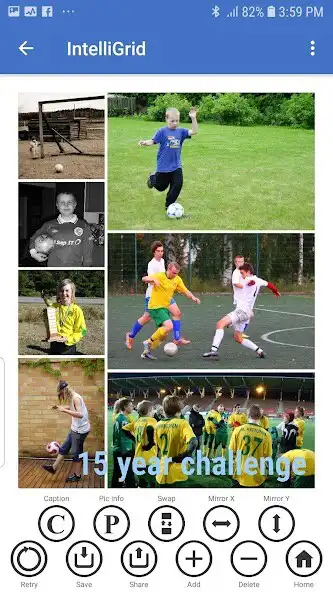
IntelliGrid Photo Stories uses proprietary AI algorithms to turn your pictures to charming little stories with a single click. Pick the images for the photo grid yourself, or let the AI choose! Whatever the number and shape of your pictures, the app arranges them on a beautiful rectangular grid, preserving your original photos with no cropping.
Caption the collage image and utilize location, camera, and photo information hidden in the picture files. Share your stories via Facebook, Instagram, Whatsapp, email or other apps.
Driven by AI
You can either select the shown images yourself, or ask the AI to choose. The AI contains a probabilistic storytelling engine, creating meaningful stories from your pictures on several layers. It scores their fit to the given preferences and finally decides which set of images to send to the graphical arrangement engine. You can ask the storytelling engine to look at all your picture files for an epic narrative, or focus to today's photos or yesterday's photos for smaller stories.
The app then uses a hybrid AI algorithm to arrange the pictures as an attractive rectangular grid of your choosing. Whatever the shape of your original pictures is, for the collage image you can target the 16x9 format (HD and 4k form factor), 3x2 (typical for DSLR cameras), 4x3, 1x1 (square - think Instagram!) or the corresponding portrait formats.
Under the hood, IntelliGrid Photo Stories leverages a combination of different proprietary AI technologies. This includes both probabilistic and brute force inference, use of heuristics, and using thousands of pre-trained models (with further mutations) for sets of images with commonly used aspect ratios. This produces, literally, billions of possible arrangements to choose from. Would you believe theres 200 million ways to arrange 6 pictures of different form factors as a rectangular grid and 400 billion ways to arrange 8 pictures! The app uses scoring to make the final choice of arrangement probabilistically, balancing perceived arrangement quality and a nice amount of variety.
Control the grid
When creating the collage image arrangement, theres a set of useful options in your control:
Set the target form factor for the produced collage image
Select the preferred image resolution
Choose the color and width for the grid lines between the pictures
Caption it with the preferred text, alignment, font, font color and size
Select what information to show for each photo from the EXIF data stored in the image files, such as camera info, date, location, author, copyright, ISO, aperture, shutter speed, focal length
After the collage image has been created, you can further process it:
Save the collage image to a file
Share it with other applications, for example publish it in Facebook
Rearrange the images by mirroring their positions in X or Y dimension
Swap the position of images
Add more pictures to, or remove images from, the collage image
Adjust settings for the collage image caption
Adjust the shown image EXIF data for each picture
Ask the AI to rearrange the photos
The AI algorithms can be further controlled with settings such as:
Adjusting the preferred story scope, from tiny stories to epic tales
Balancing between arrangement quality and the level of variation
Configuring the use of heuristics and scoring parameters
The maximum time available for auto-arranging
Visit our Facebook page here: https://www.facebook.com/IntelliGridPhotoStories
Try out the clever AI driven photo grid and play online IntelliGrid Photo Stories now for free.
Enjoy with UptoPlay the online game IntelliGrid Photo Stories.
ADDITIONAL INFORMATION
Developer:
Recent changes: Version 1.0.20
Page navigation: