


Animus UI Theme
Animus UI Theme
The official app & game
Distributed by UptoPlay
SCREENSHOTS

DESCRIPTION
Play this online game named Animus UI Theme .
Animus UI Theme is uniquegem,animusui,personalization,animus, content rating is Everyone (PEGI-3). This app is rated 5 by 2 users who are using this app. To know more about the company/developer, visit Unique Gem Visions website who developed it. net.uniquegem.animusui.apk apps can be downloaded and installed on Android 2.2.x and higher Android devices. The Latest Version of 1.3.6 Available for download. Download the app using your favorite browser and click Install to install the application. Please note that we provide both basic and pure APK files and faster play online speeds than APK Mirror. This app APK has been downloaded 4190+ times on store. You can also play online net.uniquegem.animusui APK and run it with the popular Android Emulators.
PROMOTIONAL OFFER - Buy any 2 of my themes and get the third theme of your own choice absolutely FREE! Mail me (given at the bottom) to grab the offer!  *Not Valid for themes on Sale*

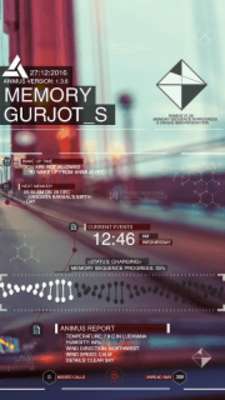
Put yourself into Animus and experience it with animations and live updates regarding various events in this magnificent designed theme. It comes with features packed details to make the widget alive and customizing it according to your flavor.

Features

- Cool Animus interface with Dynamic DNA Battery bar.

- Live Animation to bring this theme alive!

- Real-Time Weather and System Updates

- Customizable clickable shortcuts.

- Add your own custom name to memory

- Depth Customizations and Tweaks to suit your needs.

- Constant Updates and Dedicated Support

Required

- Any Launcher with ability to hide the dock and disable padding. (Nova or Apex Launcher Recommended)

Wallpapers

- Animus Wallpaper (Optional) - http://goo.gl/qN75s8

- Animus pantheon Wallpaper (Optional) - http://goo.gl/Ln8AV4

- White Abstract Wallpaper (Optional) - http://goo.gl/u18WpX

Installation Instructions for the best experience

1. Install Nova/Apex Launcher or any other supported ones if you already haven't! (It's free)

2. Go to Launcher Settings and set the Grid to 6x4 and disable the dock.

3. Install the theme and apply the given Wallpaper if you wish.

4. Go to home-screen, long tap for widgets, select Animus UI and apply both the widgets.

5.a By default, Nova Launcher applies the padding to widgets, so just long press on the widget and tap padding option to disable it.

5.b If you're using Apex Launcher, to disable padding, go to Launcher Settings->Advanced->Width Padding->None and Settings->Home Screen Settings->Horizontal and Vertical Margin->None.

Optional

6.a (Optional) If the widget isn't properly fit, set the page indicator to None or Line in Launcher Settings.

6.b (Optional) Lollipop/Marshmallow Users - Enable Transparent notification bar in Look and Feel within Launcher Settings to make the background transparent.

Give it a minute to update. Enable the animations if you want in configuration app. Enjoy!

TIP: To add app drawer to the widget hotspot. Just go to the configuration app, click on the image button next to app drawer and choose Shortcut>Nova/Apex Activity>App Drawer.

There is also configuration app provided with it to set up your own hotspots.

FAQ

Q- How can I get the layout as shown in screenshots?

A- For that, you need a custom launcher like Nova and set the launcher grid size to 6x4 and make both the widget touch the edges by disabling padding,hide the dock and enable transparent status bar in Launcher settings

Q- I have XYZ issue. HELP!

A- Since I am still new to Android Programming, it is inevitable that bugs will occur. I can only make this theme even better with your help. Please don't give a bad rating on Google Play, instead you can email me with your problem. This way, I can only troubleshoot the problems if I actually know it. Thank You!

**Live Animation works best with green wallpaper as of now. More will be added by later updates.

Support - If you find any trouble during installation or have any queries regarding this theme, please don't hesitate to email me. (Look at bottom for developer email)

Follow Facebook.com/UniqueGemAndroid for regular updates. Thanks!

Note: This theme is not affiliated nor does it endorse any products with Assassin's Creed or Ubisoft.
Updates:
- V1.3.6 (Major Update)
- 2 New Animations
- More Customizations - Now change Background and Text Color
- 3 More Shortcuts added
- Improved interface
- Bugs fixes
Animus UI Theme from UptoPlay.net
Page navigation: