


All Note - rich editor,photo,drawing,maps and more

All Note
The official app & game
Distributed by UptoPlay
SCREENSHOTS
DESCRIPTION
Play this online game named All Note - rich editor,photo,drawing,maps and more .
All Note - rich editor,photo,drawing,maps and more is risingware,allnotefree,productivity,allnote,free, content rating is Everyone (PEGI-3). This app is rated 3 by 1 users who are using this app. To know more about the company/developer, visit Risingware website who developed it. com.risingware.allnotefree.apk apps can be downloaded and installed on Android 4.1.x and higher Android devices. The Latest Version of 2.9.6 Available for download. Download the app using your favorite browser and click Install to install the application. Please note that we provide both basic and pure APK files and faster play online speeds than APK Mirror. This app APK has been downloaded 514+ times on store. You can also play online com.risingware.allnotefree APK and run it with the popular Android Emulators.
With All Note, you can keep track of wonderful things anywhere anytime.

Keep Your Ideas Anytime Anywhere
Add notes, set reminders, take shots/videos to note down your thoughts real time. Retrieve location and save phone number to dial later. Share notes anywhere

Group your notes
Label your notes with different color, tags, and category, so notes with the same color, tag or category appear together

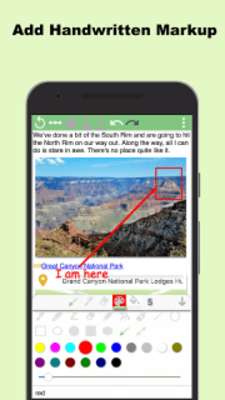
Markup Tool
Mark up important words in text or add drawings to your text or to add annotation and draw pictures on images

Backup and Restore
Backup and restore automatically and manually.

Sync to Google Drive
Sync data to Google Drive automatically and manually.

Auto Save
Automatically save a note which is being edited.

Smart Search
You can do Quick Search or go to Smart Search to do multi-condition search and manage it afterwards

Password Protection
Support Automatic or Instant Screen Lock

Open Text File
Specify code page in Settings

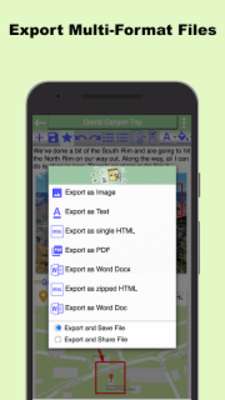
Support Multi-Format File Export
Multiple Formats are provided for file output. You can share or save a note to PC for further use. Available file formats are as below:
‧Text file
‧PDF
‧Word .doc
‧Word .docx
‧HTML single file
‧HTML zipped file

Apply to life
‧Save your location when it’s somewhere you don’t know, so you can pay a visit next time
‧In a nice eatery/restaurant, you can take pics of dishes and menu, type phone no. or get location and save them to a single note to share to others, make a reservation etc.

Key Features
‧Provide a rich text editor. To edit a note, you can
-change font, size, color, BG color and style
-set as bold, italic, underline, strikethrough, superscript, subscript
-insert an emoticon, date, time, link, divider and page
-insert a numbered list or bullet list
-set as Indent, outdent, align Left/center/right
-insert or configure a table, add a row or column and modify their properties
-use undo, redo to restore record at any time

‧You can create a note with the following different kinds of components or add it to the note
-Text components
-Drawing components
-One-time and recurring reminders
-Photo components
-Video components
-Voice Recording components
-Through Voice Input, create text components
-Select and create multimedia components
-Through a Location component, the current location is retrieved automatically. You can move and reset the anchor freely, search any locations and nearby ones. Furthermore, you can plan a tour itinerary and initiate Google Map to navigate to next destination
-Phone components
-Email components

‧Provide you with a flexible tool to
-share the content of your note to other Apps
-send it to SMS

‧With a share tool, you can share pics, videos, audio files, links and texts from any Apps to an existing/new note in AllNote for collection or editing

‧With a note-managing tool, you can do the following with selected notes
-Deleted them
-Add tags to them without affecting the existing ones in the notes
-Remove tags from them
-Configure category, tags and/or color for them

‧New categories and tags can be created
‧Edit Home Filter in Settings to filter the notes you'd like to display on Home. Filtering conditions can be set according to keywords, categories, tags, colors, component types and/or modified time. You can also edit sort order by time, title, category, tag or color

Listed below are advanced features
‧Import and export (backup and restore) safeguard the notes and components created
‧Export a note as a Text, PDF, Word .doc, Word .docx, HTML single or HTML zipped file
‧Sort order of categories, tags or colors is editable
‧The categories and tags you created can be deleted
‧Smart Search enables you to set multi-conditions and manage your search entries, which are reusable
‧Toolbar icons are manageable. You can check the ones to show and change their order
‧In move mode, each component can be moved to another place
Updates:
- 1.Reduce the frenquency of ad appearance to enhance user experiences
- 2.Add a feature of creating a shortcut for a note
- 3.No longer prevent the screen from rotating while a note is being edited
- 4.Fix an occasional issue where an error might occur while swiping up or down the top-right drop-down menu in a note
- 5.Fix an issue in which AllNote fails to start in some old Android versions
All Note - rich editor,photo,drawing,maps and more from UptoPlay.net
Page navigation: