


NovaKey - Keyboard
NovaKey
The official app & game
Distributed by UptoPlay
SCREENSHOTS
DESCRIPTION
Use UptoPlay to play online the game NovaKey - Keyboard.
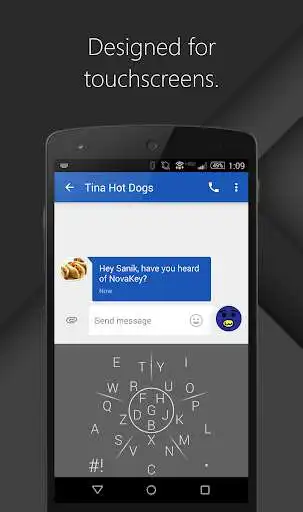
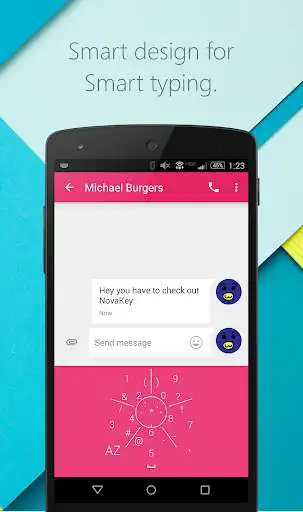
This is NovaKey the keyboard designed for touchscreens. Rather than each key being a meaningless tap, in NovaKey each key has a unique gesture. Once you learn the place of each key you will be able to type without looking more accurately than with the regular keyboard. NovaKey is looking to redesign the way we type on our devices in order to make our overall phone experience quicker and more fluid.
Join our Beta Test:
https://plus.google.com/communities/106258064775616773864
Key Features:
-Ability to quickly move the cursor
-Ability to select text and copy, cut or paste
-More special characters accessed by long pressing.
-The ability to resize and move NovaKey to a more comfortable spot
-Many colors & themes
For the Future:
-Multiple language support. (Email us or leave a review with the language you want so we have a clearer idea of what to work on)
-The ability to create custom shortcuts with all the extra space. These shortcuts could be anything from quick words to email. Quick gestures like space/backspace. Emojis. And Voice typing.
-If Android Wear allows support for 3rd party keyboards a watch version
-More settings to make NovaKey more personal
-Prediction algorithm to increase accuracy and fix spelling errors
I am open to suggestions, questions and comments.
Feel free to email me at [email protected] with the subject NovaKey with anything you would like me to add or ask.
Enjoy with UptoPlay the online game NovaKey - Keyboard.
ADDITIONAL INFORMATION
Developer: Strella Studios
Genre: Productivity
App version: 0.3.8
App size: 4.2M
Recent changes: 0.3.8
+Added a new theme
+Added a 3D option
+Added an Auto Color option
+Added the option to customize vibration level
+Added the option to customize the long press time
+better tutorial
+Made it look nicer on lollipop & marshmallow
+Fixed some bugs
Comments:
This keyboard is horrible. No tutorial on how to use it, spend more time correcting typos and switching to another keyboard just to delete typos and hit send/go/search.
I've been using this for years and have mastered its use; however, since it hasn't been updated since 2016, it often freezes on Android 8.1 making me have to frequently force stop the app. Were this issue absent, it would have my full rating.
The idea is solid, however the functionality needs work. The space and delete function would work better if you swiped outside the circle for them. Swiping over the circle is very hit-and-miss and often results in unwanted characters being typed instead. Until this functionality improves I will go back to my default keyboard.
Impossible to use. I can't even press H or U, and several other letters, because they type DIFFERENT letters! There's no use for this app except for having some 'unique' keyboard. So many typos.
Could not type some letters. No way was this oriented to my touchpad! Uninstalled, won't be back!"
Page navigation: