


Prayers Gadget (Prayer Times)

Prayers Gadget (Prayer Times)
The official app & game
Distributed by UptoPlay
SCREENSHOTS
DESCRIPTION
Play this online game named Prayers Gadget (Prayer Times) .
Prayers Gadget (Prayer Times) is hawa,lifestyle,prayers,gadget, content rating is Everyone (PEGI-3). This app is rated 5 by 1 users who are using this app. To know more about the company/developer, visit Marwah Tech Solutions website who developed it. com.hawa.apk apps can be downloaded and installed on Android 4.1.x and higher Android devices. The Latest Version of 5.1 Available for download. Download the app using your favorite browser and click Install to install the application. Please note that we provide both basic and pure APK files and faster play online speeds than APK Mirror. This app APK has been downloaded 449+ times on store. You can also play online com.hawa APK and run it with the popular Android Emulators.
Prayers Gadget Features:

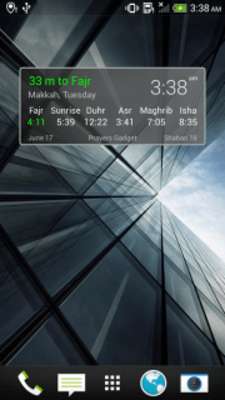
- Islamic prayer times, with remaining time to next prayer

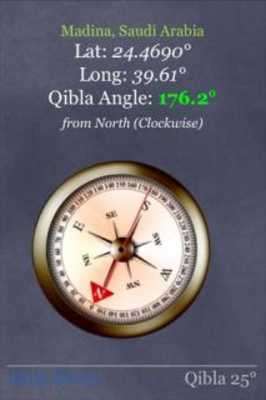
- Qibla direction

- Azkar and Tasbeeh

- Hijri and Gregorian calendars

- Important Islamic events

- Nearby Mosques and Islamic centers

- Azan (Adhan), Iqama, and Reminders (Duaa) at prayer time

- Can automatically set your phone to silent mode during prayer periods

- You can set up an Alarm at an exact time or before/after a particular Azan

- You can use GPS, the Internet, or set your location manually

- A unique feature of Prayers Gadget is that it can accept a prepared prayer timetable from a CSV file. This means you can set the prayer times to EXACTLY match those of your city or local Islamic center.

- Prayers Gadget contains a Widget to display Islamic prayer times, with remaining time to next prayer

- You can either use Prayers Gadget as a regular App, or you can put your phone/tablet on a stand in your home/office/local mosque to display Islamic prayer times and play Azan

Please remember us in your prayers.

Notes:

1. Since the settings screen has been changed, you might need to re-enter your settings again in this version.

2. Since this version is a complete re-write of the App, please expect some bugs (you can report them to: [email protected])

3. If you cannot see the App Widget, please reboot your phone. This usually fixes the issue.

4. Make sure you do NOT install the App on the SD card if you want to use the Widget associated with the App. Rather, install the App on the phone itself.

5. Please browse through the different settings of Prayers Gadget to improve the calculated prayer times and to discover its large set of features.

6. Your feedback is highly appreciated. So, if the prayer times displayed by the Gadget are different than the ones officially used by your country, and there is a Website that displays these official prayer times, please send a link to such Website by email to [email protected]. Thanks.

Prayers Gadget requests the following permissions:

- Location: precise location (GPS) and approximate location (network-based)

This is used to auto-detect your location when Prayers Gadget is first run, and when you select the “auto-detect” command from the settings menu

- Internet: full network access

If the above location detection methods fail, Prayers Gadget will try (as a last resort) to detect your location utilizing the Internet. However, this technique might not be as accurate as using the Location service in your phone. In addition, the Internet is accessed when you check for a new version of the Gadget.

- Read the contents of your storage

This allows the user to assign a custom audio file from his/her phone storage for Duaa, Azan, Iqama and Alarm. It also allows the user to read a CSV file filled with custom prayer times, if the user wants that.

- Read phone status and identity

- Change your audio settings

This is used to check if the user is making a phone call when an Alarm or Azan sets off. Prayers Gadget automatically reduces the Alarm/Azan Volume if the user is on the phone to avoid annoying or hurting the user when his ear is so close to the phone.

- Run at startup

- Disable your screen lock

- Control vibration

All the above allow Prayers Gadget to sound the Alarm and Azan at the proper times, even if the phone is locked. The default settings do not sound any Alarm or Azan. The user has to enable those in the Options page for Prayers Gadget to start sounding them.

- Prevent device from sleeping

When you run Prayers Gadget the screen stays on. This allows you to put your phone/tablet on a stand in your home/office/local mosque to display Islamic prayer times and play Azan, without the screen turning off every minute or so.
Updates:
- Version 4.6
Added option to remove status bar notifications
Added option to prevent duaa/azan/iqama/alarm during silent mode
Fixed issue of duaa/azan/iqama not sounding when app was killed by Android
Prayers Gadget (Prayer Times) from UptoPlay.net
Page navigation: